
Generate a shopping cart UI in Flutter using AI by describing your requirements in plain language. Rocket builds the full project withCartProviderstate, product models, and checkout navigation. Code export needs a paid plan. App Store submission still requiresXcodeand an Apple Developer account.
Learning how to generate a shopping cart UI in Flutter is now faster than ever with AI builders. Rocket turns a plain-language prompt into a complete Flutter project with product models,CartProviderstate management, and checkout navigation in minutes, not weeks.
This guide covers the architecture, the code patterns AI generates, and the UX decisions that keep users from abandoning.
Why Flutter Shopping Cart Projects Stall Before Launch
Why do 70% of online shopping carts get abandoned before checkout?
According to Baymard Institute, that 70.22% average abandonment rate costs businesses $260 billion in recoverable revenue annually. For Flutter developers building e-commerce apps, this number signals something specific: your cart UI needs to be fast, intuitive, and frictionless from the first build.
Building that kind of shopping cart in Flutter used to mean weeks of widget composition, provider setup, and manual state wiring. AI tools have changed the process entirely, turning what used to be a multi-sprint task into something you can scaffold in minutes. So the real question is: which approach gets you to a production cart screen fastest?
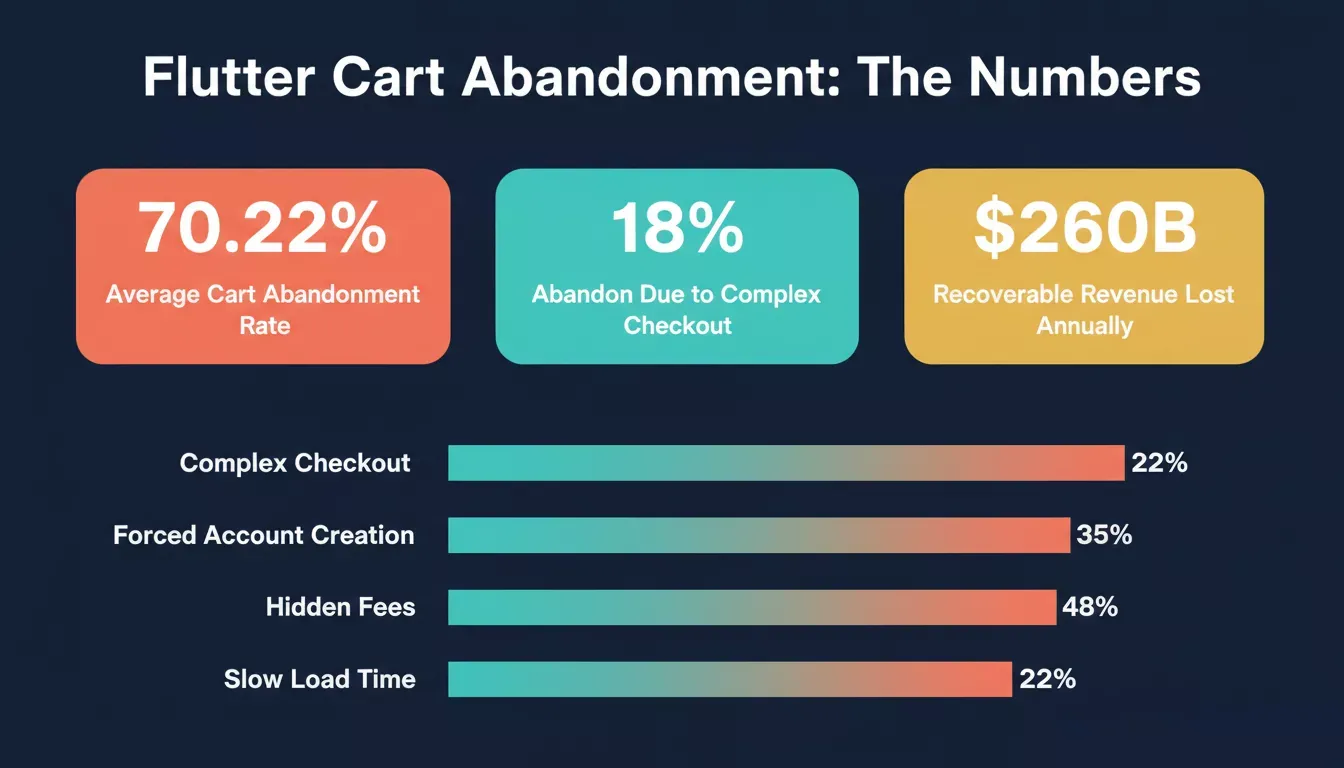
Key cart abandonment figures every Flutter e-commerce developer should know before building.
What Makes a Flutter Shopping Cart Tricky to Build
The short answer: A Flutter cart is harder than it looks because it requires coordinating state, UI, and navigation simultaneously across multiple screens, all before you write a single product-specific line of code.
Here are the five layers that trip up most developers:
-
State coordination across screens: your cart state must persist as users move between the product screen, cart screen, and checkout
-
Provider scope management: a provider manages cart data at the app level, but consumer widgets in each screen must rebuild correctly when items change
-
Product model architecture: each product needs a data class with name, imageUrl, and price fields that map cleanly to your UI
-
Quantity and removal logic: increment, decrement, and remove operations must update state, recalculate total price, and trigger widget rebuilds without errors
-
File and folder organization: models, providers, screens, and widgets each belong in separate files with a structure that scales
When you add animations, error handling, and loading states on top of this, even experienced developers can spend several weeks getting everything connected. An AI-powered Flutter builder compresses that timeline significantly. The real leverage is in skipping the wiring phase entirely and starting from working, connected code.
How Does State Management Affect Cart Performance
CartProvideris the central nervous system of a Flutter cart. A class that extendsChangeNotifierholds your cart items list, exposes a totalPrice getter, and provides methods for add, remove, and update, all in one place.
Key patterns to understand:
-
The CartProvider pattern: class
CartProviderextendsChangeNotifierholds your cart items list, exposes atotalPricegetter, and provides methods for add, remove, and update actions -
Consumer widget rebuilds: each
Consumerwidget only rebuilds the specific part of the UI that changed, not the entire screen -
Product quantity tracking: the provider manages both the item reference and its count independently
-
Cart state persistence: saving cart state across app sessions requires async storage integration in the provider's
initState
Here is what aCartProviderlooks like in practice. This is the kind of code an AI builder generates automatically:
1class CartProvider extends ChangeNotifier {
2 final List<CartItem> _items = [];
3
4 List<CartItem> get items => _items;
5
6 double get totalPrice {
7 return _items.fold(0, (total, item) => total + item.product.price * item.quantity);
8 }
9
10 void addItem(Product product) {
11 final index = _items.indexWhere((item) => item.product.id == product.id);
12 if (index >= 0) {
13 _items[index].quantity++;
14 } else {
15 _items.add(CartItem(product: product, quantity: 1));
16 }
17 notifyListeners();
18 }
19
20 void removeItem(String productId) {
21 _items.removeWhere((item) => item.product.id == productId);
22 notifyListeners();
23 }
24
25 void updateQuantity(String productId, int quantity) {
26 final index = _items.indexWhere((item) => item.product.id == productId);
27 if (index >= 0) {
28 if (quantity <= 0) {
29 _items.removeAt(index);
30 } else {
31 _items[index].quantity = quantity;
32 }
33 notifyListeners();
34 }
35 }
36}
That single class handles add, removal, quantity updates, and total price calculation. When connected via native Flutter code generation, the provider manages your entire cart functionality without you wiring each method manually.
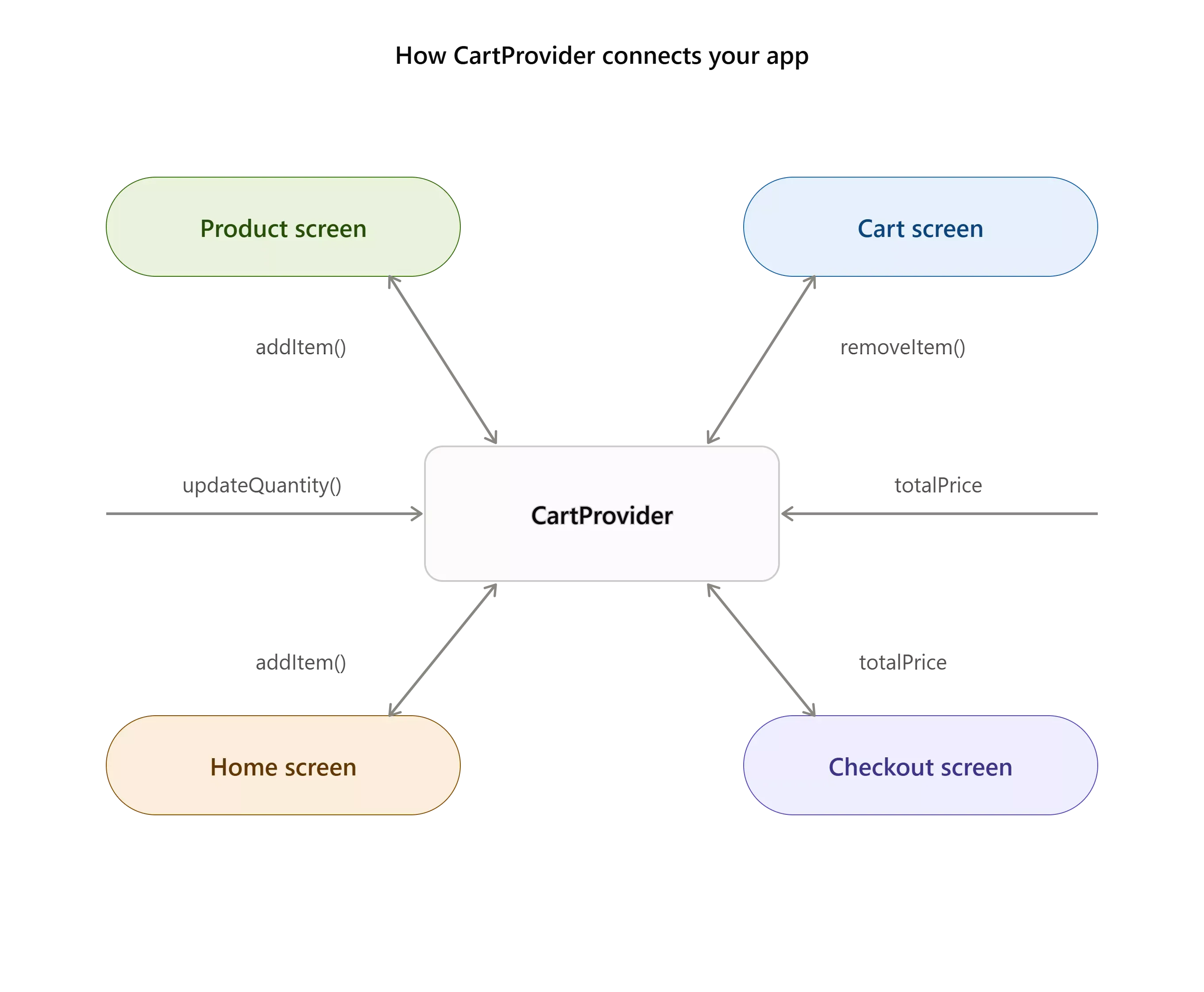
CartProvideracts as the single source of truth, broadcasting state changes to every connected screen.
Can AI Write Your Cart Widget Architecture
Yes, and the output is often more consistent than a first-pass manual implementation. AI builders parse your prompt, detect the components you need, and generate a connected Flutter project with correct widget hierarchy and state wiring already in place.
| Factor | Manual Coding | AI-Generated |
|---|---|---|
| Setup time | Several weeks for a production cart | Under 10 minutes for initial scaffold |
| State management | Manual provider wiring | Auto-connected |
| Widget testing | Write tests per widget | Pre-validated structure |
| Code quality | Varies by developer experience | Consistent patterns |
| Iteration speed | Hours per change | Seconds per prompt |
Timeframes reflect Rocket's observed generation times and typical Flutter project setup overhead. Individual results vary by project complexity.
According to Foresight Mobile, Flutter development is already 40-60% faster than native. Gareth Reese, CTO at Foresight Mobile, notes after delivering 50+ Flutter apps: "Flutter MVPs typically launch in 12-16 weeks vs 20-28 weeks for separate native apps." When you add AI generation on top of Flutter's speed advantage, the initial scaffold drops from weeks to minutes.
The widget build method below shows what AI produces for a cart screen using the provider package. Notice howBuildContextflows through each child widget and the children array nests cleanly:
1class CartScreen extends StatelessWidget {
2 const CartScreen({super.key});
3
4 @override
5 Widget build(BuildContext context) {
6 final cartProvider = Provider.of<CartProvider>(context);
7 final items = cartProvider.items;
8
9 return Scaffold(
10 appBar: AppBar(
11 title: const Text('Shopping Cart'),
12 actions: [
13 IconButton(
14 icon: const Icon(Icons.delete_outline),
15 onPressed: () => cartProvider.clearCart(),
16 ),
17 ],
18 ),
19 body: items.isEmpty
20 ? const Center(child: Text('Your cart is empty'))
21 : Column(
22 children: [
23 Expanded(
24 child: ListView.builder(
25 itemCount: items.length,
26 itemBuilder: (context, index) {
27 final item = items[index];
28 return Row(
29 children: [
30 Image.network(item.product.imageUrl, width: 80, height: 80),
31 Text(item.product.name),
32 Text('\$${item.product.price}'),
33 IconButton(
34 icon: const Icon(Icons.remove),
35 onPressed: () => cartProvider.updateQuantity(
36 item.product.id, item.quantity - 1)),
37 Text('${item.quantity}'),
38 IconButton(
39 icon: const Icon(Icons.add),
40 onPressed: () => cartProvider.updateQuantity(
41 item.product.id, item.quantity + 1)),
42 ],
43 );
44 },
45 ),
46 ),
47 Padding(
48 padding: const EdgeInsets.all(16),
49 child: Row(
50 mainAxisAlignment: MainAxisAlignment.spaceBetween,
51 children: [
52 Text('Total: \$${cartProvider.totalPrice.toStringAsFixed(2)}'),
53 ElevatedButton(
54 onPressed: () => Navigator.push(context,
55 MaterialPageRoute(builder: (context) => const CheckoutScreen())),
56 child: const Text('Checkout'),
57 ),
58 ],
59 ),
60 ),
61 ],
62 ),
63 );
64 }
65}
CartScreenextendsStatelessWidgetand usesProvider.of<CartProvider>(context)from the provider package, a clean, standard pattern that compiles correctly. The complete file includes cart button interactions, product image display, quantity controls, and navigation to checkout, all generated from a single descriptive prompt.
For more on how AI handles complex app logic, see how AI decodes multilayer app logic and the patterns it uses to keep code clean.
Before You Start: What to Know
Heads-up before you build: A few things to set expectations correctly.
-
Code download requires a paid plan. Viewing and iterating on your app is available on the Free plan (20 one-time credits). Downloading the Flutter source code as a .zip requires a Pro plan ($25/month) or above, per the Rocket docs.
-
Flutter output is phone-optimized. Rocket currently generates mobile-optimized Flutter apps for phones. Tablet and desktop layouts are not automatically generated.
-
App Store submission requires standard tooling. Publishing to the Apple App Store requires an Apple Developer account ($99/year), a Mac, and Xcode. Publishing to Google Play requires a Google Play Console account. Rocket generates the production-ready code and APK; the store submission steps follow standard Flutter deployment procedures.
-
APK download requires a paid plan. Building and downloading an Android APK requires Pro or above.
How Rocket Ships Flutter Carts Faster Than Any IDE
Rocket's advantage is eliminating the setup phase entirely. While other tools require you to install the Flutter SDK, configure dependencies, open Android Studio, and create a new project from scratch, Rocket starts from your description and outputs production-ready code instantly.
-
Prompt-to-cart in one step: describe your shopping cart requirements in plain language and receive a complete Flutter project with models, providers, screens, and navigation already connected
-
State management pre-wired: your
CartProvider, product screen, home screen, and checkout flow come connected with correct context passing from the start -
Source code you own: on a paid plan, Rocket gives you the full source code as clean Dart files you can export to any IDE and customize without limits
-
Instant iteration: change your cart layout, add a cart button badge, or update your product models by prompting again; each iteration builds on the existing project structure
-
Dependency management handled: Flutter package versions, import declarations, and pub dependencies are managed automatically in your pubspec.yaml
Competitors like FlutterFlow give you visual builders, but you hit walls when custom cart functionality requires code-level control. Cursor and Copilot help with autocomplete but still expect you to architect everything yourself. Rocket handles the full path: from market research to shipping production Flutter apps solo.
Rocket also integrates Supabase directly for backend and auth, which means your cart can persist data across sessions without writing a single API route manually. Learn more about how Supabase and Rocket work together to handle backend logic for mobile apps.
If you are comparing options before committing, the FlutterFlow alternatives breakdown covers where each tool breaks down for production cart builds.
Which Cart UI Patterns Keep Users From Abandoning
The data is clear: most cart abandonment is caused by friction, not intent. Removing that friction at the UI level is the highest-leverage optimization you can make after getting the architecture right.
-
Show total price in the cart view: according to BelVG's 2026 research, 18% of shoppers abandon their shopping cart due to complex checkout flows; displaying the running total with every item change reduces this friction
-
Persistent cart state across sessions: users who leave and return expect their items to still be there; save cart data to local storage so the cart survives app restarts
-
One-tap quantity controls: stepper widgets with clear increment and decrement buttons let users adjust without typing; keep the cart button for adding items visible and responsive
-
Empty cart handling: when items reach zero, display a helpful empty state with a path back to the product catalog instead of a blank screen
-
Real-time price updates: every quantity change should instantly recalculate and display the new total price without page reloads or loading indicators
When building e-commerce apps with AI, these UX patterns get baked in automatically. You describe the experience you want, and the generated cart follows established conversion principles.
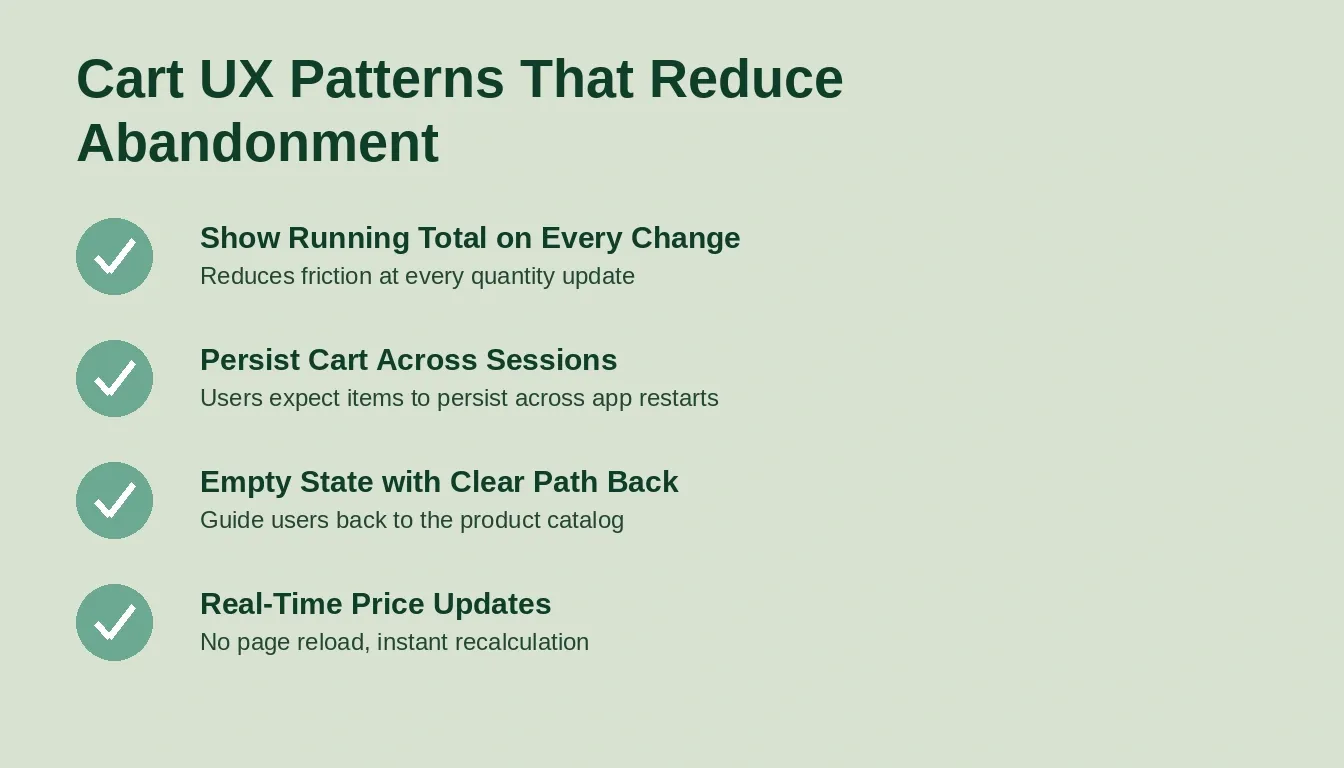
Five UX patterns that directly reduce cart abandonment in Flutter e-commerce apps.
For a deeper look at how AI handles the full e-commerce build, including product catalog and order management, the e-commerce store build guide walks through the complete flow.
Step-by-Step: From Prompt to Production Cart
The full path from idea to working Flutter shopping cart takes five steps with Rocket. Here is exactly how it works:
-
Describe your cart requirements: write what your shopping cart should include: product list with images, quantity selector, price display, remove functionality, and checkout navigation
-
AI analyzes and decomposes: the builder detects required components: product data models, cart state provider, UI widgets for each screen, and routing between views
-
Code generation runs: Dart files for each layer are created: product model, cart provider, product screen, cart screen, and checkout screen, with all import statements pre-configured
-
Preview and iterate: view your running app, test the cart flow, then refine with follow-up prompts to adjust styles, add features, or update the layout
-
Export and deploy: on a paid plan, download the Flutter project as a .zip and open it in Xcode or Android Studio; follow standard App Store or Google Play submission steps
The whole process takes minutes to reach a working preview. For prompts that produce faster Flutter builds, be specific about your cart item's structure, navigation flow, and style preferences.
From a plain-language description to exported, deployable Flutter code in five steps.
Building a shopping cart in Flutter no longer requires weeks of manual widget assembly, provider debugging, and file restructuring. AI tools have compressed the process into a single step: describe what you need, and get working code that handles cart state, product displays, quantity management, and checkout navigation out of the box.
You can also share your Flutter app as a web preview before going through app store submission, which is useful for early testing and stakeholder review. The Flutter PWA sharing guide covers how to do this without any native build steps.
Ready to generate a shopping cart UI in Flutter without writing widget trees by hand?
Start building on Rocket and describe your cart flow, get production-ready Dart code, and ship to app stores in minutes.
Table of contents
- -Why Flutter Shopping Cart Projects Stall Before Launch
- -What Makes a Flutter Shopping Cart Tricky to Build
- -How Does State Management Affect Cart Performance
- -Can AI Write Your Cart Widget Architecture
- -Before You Start: What to Know
- -How Rocket Ships Flutter Carts Faster Than Any IDE
- -Which Cart UI Patterns Keep Users From Abandoning
- -Step-by-Step: From Prompt to Production Cart