

Build a custom reminder system with email (Resend) and SMS (Twilio) to cut SaaS churn. Add Supabase for state tracking and a real-time dashboard. Rocket.new generates the full stack from one focused Build session.
SaaS products lose users not because the product fails, but because the product goes quiet. Every missed appointment, forgotten task, or lapsed subscription is a gap where a well-timed message could have changed the outcome.
This guide walks through the complete architecture for building a custom reminder system that closes those gaps, from the configuration panel and channel routing logic to Supabase state tracking and a real-time performance dashboard.
Why Do SaaS Apps Lose Users Without Automated Reminders?
Most voluntary churn is a disengagement problem, not a product problem. Users sign up with intent, complete onboarding, then slowly drift away when nothing pulls them back. A well-timed, automated reminder is the lowest-cost retention mechanism available to any SaaS team.
- No-shows and missed appointments drain revenue. In service-based SaaS, missed client meetings translate directly to cancellations. An automated reminder sent at the right time keeps the schedule full and the client relationship active.
- Recurring tasks go forgotten without nudges. Users set up workflows on day one, then lose the habit by week three. Without scheduled reminders, the app becomes invisible.
- Notification personalization drives retention. Targeted push notifications achieve a 39% retention rate at 11+ sessions, compared to just 21% for broadcast messages, with personalization improving reaction rates by up to 400%.
- The cost gap is dramatic. It costs five to seven times more to acquire a new customer than to keep one engaged with timely follow-ups.
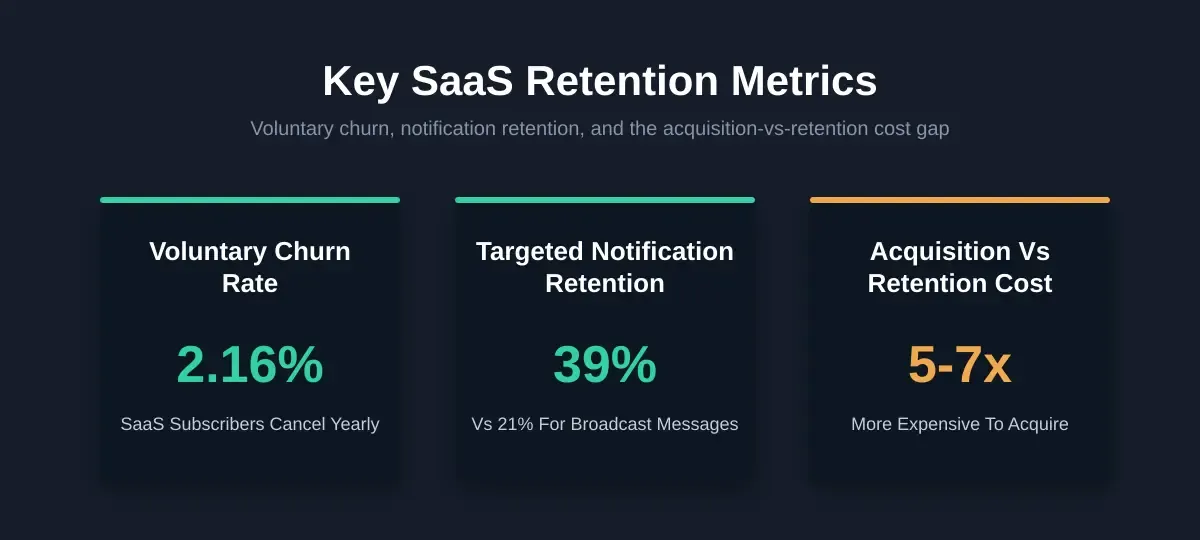
Key SaaS retention numbers: voluntary churn rate, notification retention lift, and the cost gap between acquiring and retaining users.
2.16% of SaaS subscribers voluntarily cancel each year, even when they haven't found something better. The answer, more often than not, is silence. Users forget a task, miss a deadline, or simply stop engaging because nothing reminded them to come back.
A well-timed reminder is not spam. It is a retention mechanism that costs almost nothing compared to acquiring new subscribers. This guide covers the full architecture to build a custom reminder system inside your SaaS app.
What is a Reminder System in SaaS?
A reminder system is an automated workflow that sends email or SMS nudges when a user has not completed a scheduled action. It tracks each reminder lifecycle from scheduled through delivered to completed, escalates across channels when a user does not respond, and logs outcomes back to a dashboard so your team can optimize timing and frequency.
The core components of any custom reminder system are: a configuration panel (when and how often to send), a channel router (email via Resend, SMS via Twilio), a state tracker (Supabase), and a performance dashboard (open rate, completion rate, snooze frequency). This is distinct from a drip campaign, which is time-based and fires regardless of user behavior.
What Goes into a Reminder Configuration Panel
A good configuration panel gives your team control over three dimensions: when, how often, and through which channel each reminder fires. This panel lives in your admin dashboard and connects to your backend through API routes that trigger the scheduler.
- Frequency settings let you define recurring reminders (daily, weekly, or custom intervals) along with one-time appointment alerts and deadline-based triggers
- Channel selection determines whether a user receives the reminder via email, SMS, or a combination based on their stated preference
- Escalation thresholds set the rules for what happens when a user ignores the first reminder: after how many missed responses does the system escalate to a different channel or increase urgency?
- Message templates store pre-written reminder copy that auto-populates with user-specific variables like name, appointment time, and task details
- Snooze rules give users agency to delay a reminder by a set interval rather than dismissing it permanently
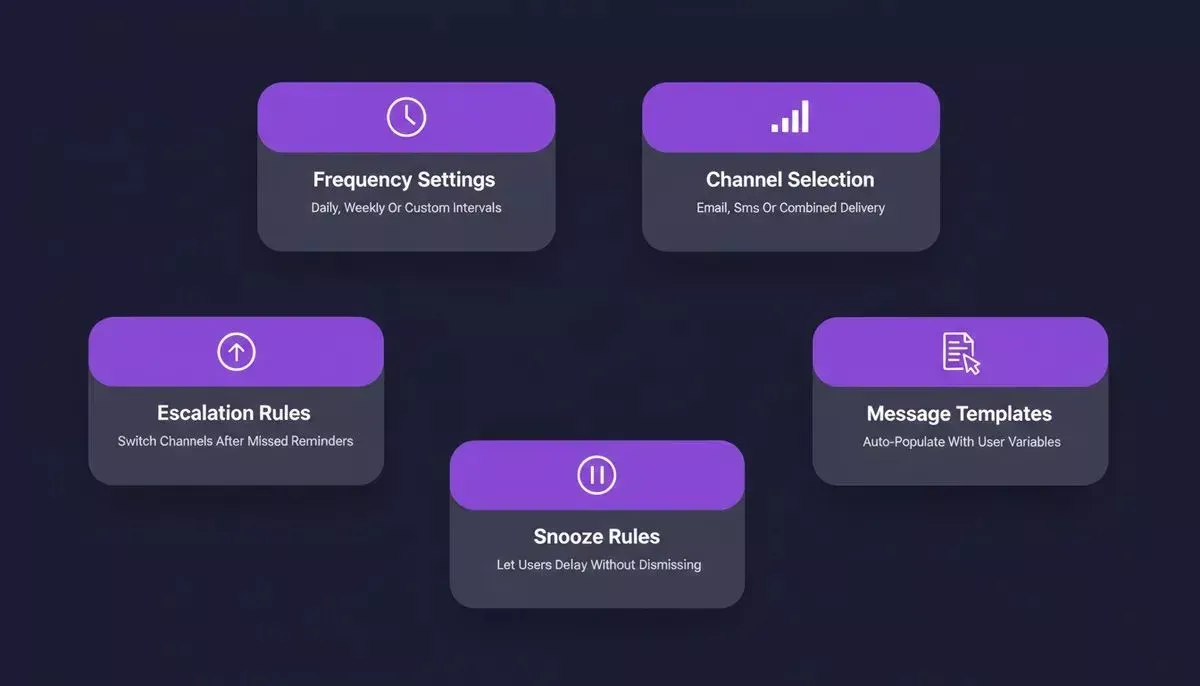
The five control dimensions of a reminder configuration panel are each mapped to a distinct behavior in the scheduler.
| Config Parameter | Purpose | Example Value |
|---|---|---|
| Frequency | How often does the reminder repeat | Every 48 hours |
| Channel priority | First-choice delivery method | Email then SMS |
| Escalation after | Missed reminders before channel switch | 2 ignored |
| Snooze duration | User-requested delay | 30 minutes |
| Quiet hours | Times when no reminders fire | 10pm to 7am user local |
This panel connects to your B2B SaaS backend through API routes that trigger the scheduler. For teams building appointment-based workflows, the Cal.com API integration guide shows how to wire scheduling triggers directly into reminder logic.
How Multi-Channel Delivery Reaches Users Where They Are
A single-channel approach misses people. Some users respond to email immediately; others need an SMS to act. Rocket.new's two natively-wired reminder channels cover the majority of users out of the box when you build a custom reminder system.
Email via Resend
Resend handles transactional email delivery for your reminder system. Describe the email flow in chat, and Rocket generates the complete implementation: templates, send logic, and secure API integration. Resend is purpose-built for transactional messages, including welcome emails, password resets, order confirmations, and timed reminder sequences. Transactional email reminders carry higher open rates than marketing emails because they contain appointment-specific information the user is expecting.
SMS via Twilio
Twilio handles SMS delivery for your custom reminder system. Rocket's Twilio connector covers phone verification codes, two-factor authentication, order and shipping updates, appointment reminders, and outbound alert notifications. Describe the SMS flow in chat, and Rocket generates the message templates, sending API calls, phone number formatting, and delivery tracking. Twilio pairs naturally with Supabase, which stores verification codes and user phone numbers.
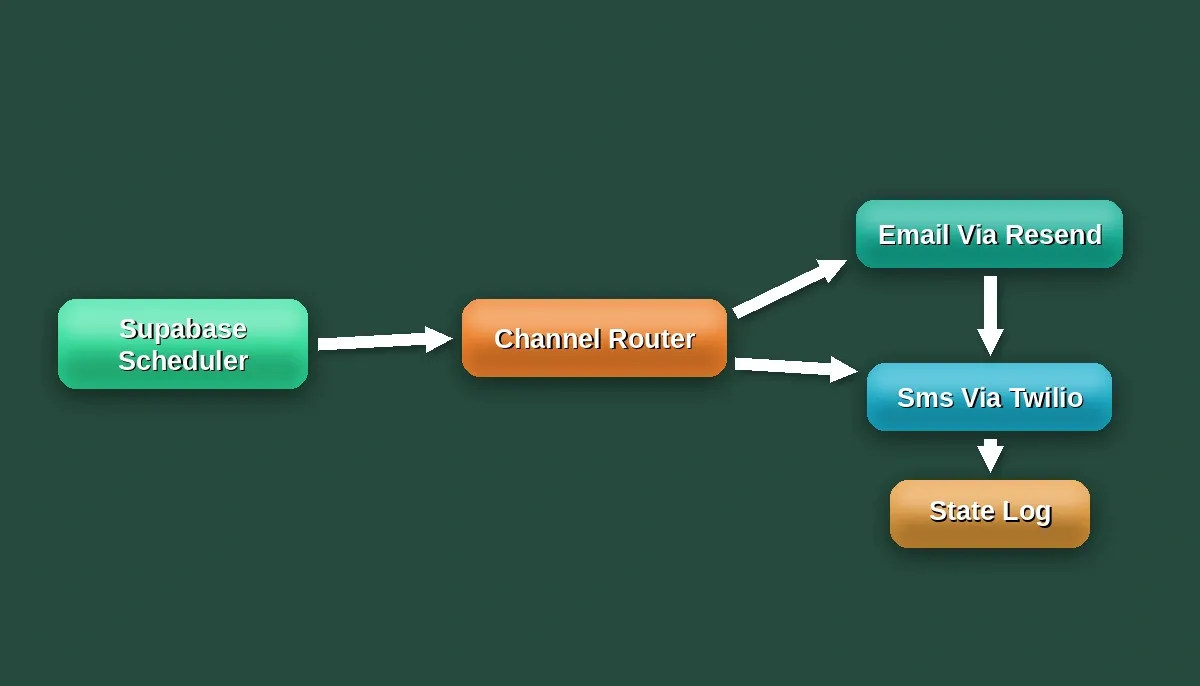
The channel router checks each user's preference, falls through to SMS if email goes unanswered, and logs every delivery back to Supabase.
The channel router checks each user's preference, then falls through to the next option if delivery fails or goes unanswered. This creates a reliable notification system where no reminder falls through the cracks, even if a user's inbox is full or their phone is offline.
For teams building SaaS apps with AI tools, this two-channel architecture is the fastest path to measurable retention improvement without over-engineering the delivery layer.
Tracking Completion State With Supabase
The reminder is only half the story. You also need to know whether the user actually completed the action. This is where Supabase handles the state management layer of your custom reminder system.
Supabase bundles PostgreSQL, authentication, file storage, and edge functions into a single service. For a reminder system, Rocket scaffolds a reminders table that tracks each record through a distinct lifecycle: the reminder ID, user ID, current state, channel used, timestamp of last delivery, and the number of attempts made so far.
Reminder lifecycle: six states tracked in Supabase from Scheduled to Completed, with escalation and snooze paths.
Reminder lifecycle: six states tracked in Supabase from Scheduled to Completed, with escalation and snooze paths.
Row-level security in Supabase keeps each user's reminder data private. Real-time subscriptions update the dashboard the moment a state changes. Supabase Edge Functions handle the server-side scheduling logic, sending emails or SMS without exposing API keys to the client.
For a deeper look at how Supabase integrates with Rocket's build flow, the Supabase and Rocket.new integration guide covers schema scaffolding, RLS policies, and edge function setup in detail. Teams building SaaS subscription platforms will find that the same Supabase patterns apply directly to reminder state management.
How Rocket Generates the Full Reminder Stack
You have seen the architecture: config panel, multi-channel delivery, state tracking, and a dashboard. That is a lot of moving parts to wire together manually when you build a custom reminder system. Rocket generates the entire stack from a focused Build session.
- One prompt, full reminder system. Describe your reminder requirements in natural language. Rocket generates the Supabase schema, API routes for Resend and Twilio, the admin config panel, and the user-facing notification preferences page.
- Pre-wired connectors. Resend and Twilio SDKs are native connectors in Rocket. Connect them from the Connectors tab or by mentioning them in chat. Supabase scaffolds the backend tables, RLS policies, and edge functions automatically.
- Escalation logic built in. The generated system includes threshold-based channel switching, snooze handling, and quiet-hour rules from the start.
- Performance dashboard included. Open rate, completion rate, and snooze frequency per reminder type render in a real-time dashboard connected to your Supabase data.
Other approaches require stitching together multiple services, writing custom cron jobs, and managing deployment for each piece independently. That process takes weeks for a dev team, or months for a solo founder. Rocket ships production-ready apps with this logic already connected.
For founders evaluating build approaches, the AI app builder vs hiring developer ROI comparison breaks down exactly where the time and cost savings compound on projects like this one. Teams building SaaS products with AI will also find Rocket's connector-first architecture reduces integration debt significantly.
Extending to Push Notifications and WhatsApp
Resend and Twilio SMS cover the majority of reminder use cases out of the box. If your users are concentrated in markets where WhatsApp dominates, or if your app needs native mobile push notifications, Rocket's API import feature lets you wire any REST API into your custom reminder system build.
From the Build editor, open the APIs panel and import your endpoint definition via a Postman collection, cURL command, or OpenAPI spec. Rocket generates the connection code, error handling, and data mapping automatically. This means you can connect:
- OneSignal or Firebase Cloud Messaging for native push notifications on Android and iOS
- WhatsApp Business API via Twilio or Meta for WhatsApp-based reminder delivery in markets where it is the dominant messaging channel
These are custom integration steps rather than one-click connectors, but the API import flow reduces the setup to a prompt and a credential. Store your API keys as environment variables in Rocket so they never appear in source code.
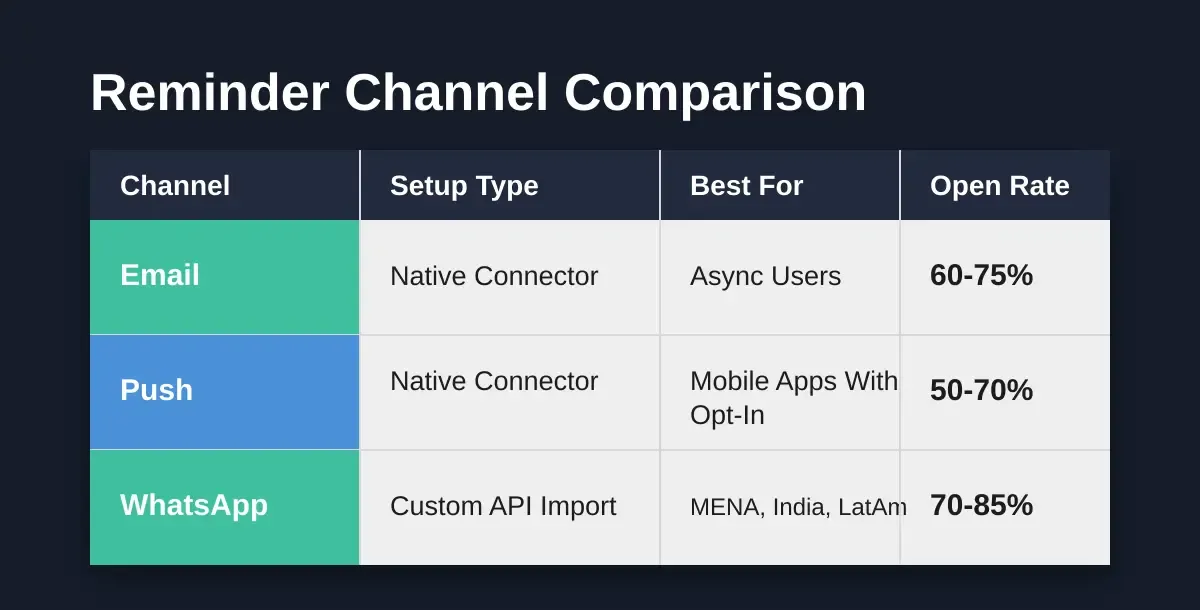
Native connectors cover Email and SMS out of the box. Push and WhatsApp are available via Rocket's API import for custom integration.
| Channel | Native Connector | Custom via API Import | Best For |
|---|---|---|---|
| Resend | Not needed | All markets, async users | |
| SMS | Twilio | Not needed | High-urgency, mobile-first |
| Push notifications | Not available | OneSignal, FCM | Mobile apps with opt-in |
| Not available | Twilio or Meta API | MENA, India, LatAm markets |
Measuring Reminder Performance With a Dashboard
Sending reminders without tracking results is like running ads without analytics. Your custom reminder system dashboard should surface three core metrics per reminder type, updated in real time from Supabase.
| Metric | What It Measures | Target Range |
|---|---|---|
| Open rate | Percentage of delivered reminders that users viewed | 60 to 75% |
| Completion rate | Percentage of opened reminders where users took the intended action | 40 to 60% |
| Snooze frequency | How often users delay rather than act or dismiss | Below 20% |
A high snooze frequency signals that your timing is off, not that users are disengaged. Adjust send times based on the data. A low open rate on email but high SMS response rate tells you to shift that user segment's primary channel.
The dashboard also surfaces follow-up patterns: which reminder types convert on the first attempt versus needing escalation. This data feeds back into your configuration panel, allowing you to reduce no-shows and cancellations systematically rather than guessing.
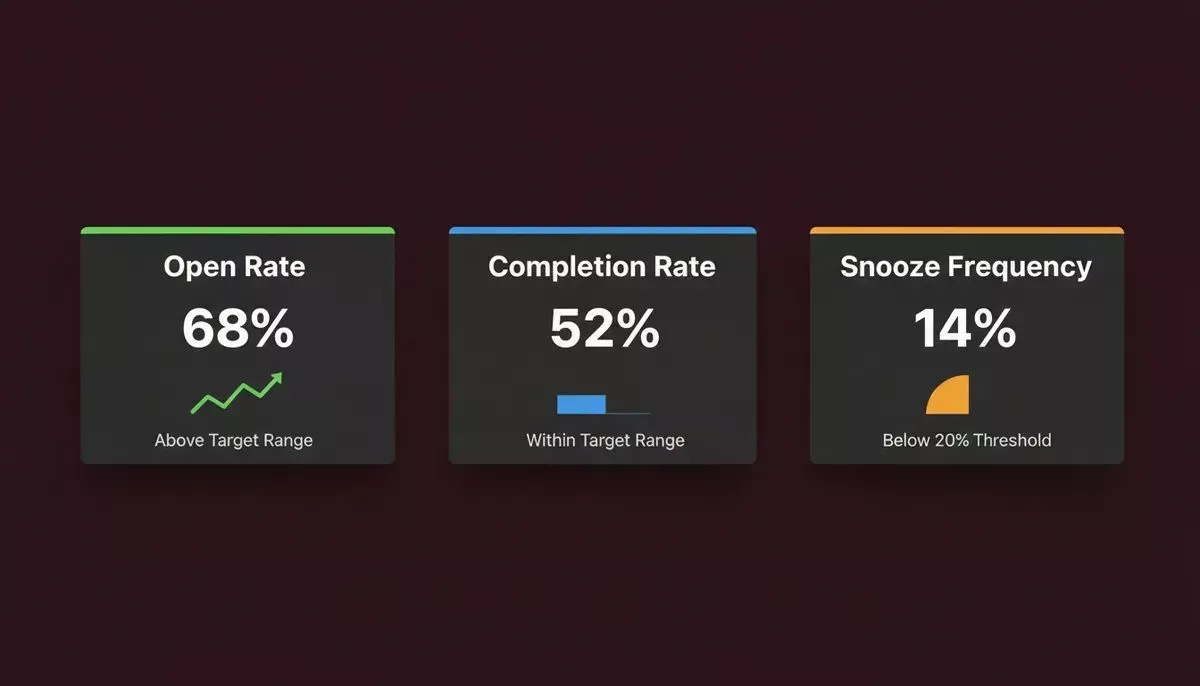
Three core reminder metrics tracked in real time: open rate, completion rate, and snooze frequency per reminder type.
Track these numbers weekly. Apps that monitor their engagement metrics and adjust cadence based on actual completion data see compounding retention gains month over month. For teams who want to go deeper into analytics, the data visualization dashboard guide covers how to surface these metrics in a way that drives product decisions.
Build Custom Reminder System with Rocket
Ready to build a custom reminder system that actually reduces churn?
Start a Build session on Rocket.new and describe your reminder workflow in plain language.
Email delivery via Resend, SMS via Twilio, Supabase state tracking, and a real-time performance dashboard will be generated together in one focused session, production-ready from day one.
Table of contents
- -Why Do SaaS Apps Lose Users Without Automated Reminders?
- -What is a Reminder System in SaaS?
- -What Goes into a Reminder Configuration Panel
- -How Multi-Channel Delivery Reaches Users Where They Are
- -Email via Resend
- -SMS via Twilio
- -Tracking Completion State With Supabase
- -How Rocket Generates the Full Reminder Stack
- -Extending to Push Notifications and WhatsApp
- -Measuring Reminder Performance With a Dashboard
- -Build Custom Reminder System with Rocket

