
MCP for AI Agents is a standardized protocol that connects large language models to external tools, data sources, and APIs. It eliminates custom connectors and makes agentic workflows composable, secure, and production-ready.
Why are OpenAI, Google, and Microsoft all backing a protocol that Anthropic created?
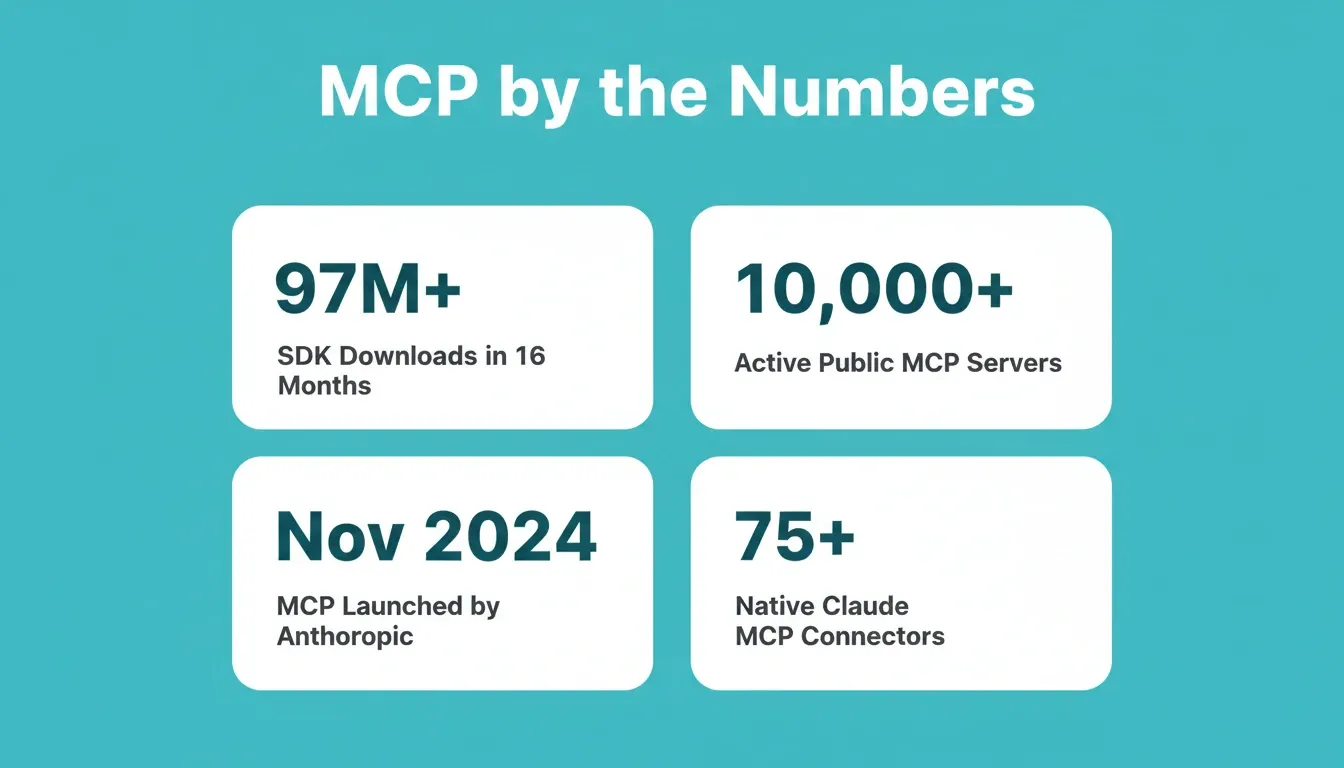
The Model Context Protocol (MCP) crossed 97 million SDK downloads in just sixteen months. That is the fastest adoption curve ever recorded for any AI infrastructure standard in history.
For teams building agents that need to access real-world data sources, fetch files from cloud storage, or trigger actions in business tools, MCP offers a single standardized layer. It replaces dozens of fragile custom connectors.
This blog breaks down how the protocol works, what you can build with it today, and how to implement it without writing custom code for each data source.
What s the Model Context Protocol and Why Does It Matter?
The Model Context Protocol (MCP) is an open standard introduced by Anthropic in November 2024. It defines how AI models communicate with external tools and data sources through a universal interface. Before MCP, connecting an AI model to a new tool meant writing a custom integration from scratch, every time, for every model.
-
Think of MCP like a USB-C port for AI systems. Before USB-C, each device needed a different cable. Similarly, each AI model connecting to an external tool required its own authentication, data format handling, and error management.
-
MCP standardizes this into a client-server architecture. An MCP client sits inside the host application. An MCP server exposes specific capabilities from an external system, such as a database, a CRM, a code repository, or a file system. The MCP server publishes available tools and resources that any MCP client can discover through a process called tool discovery.
-
The result is addition instead of multiplication. One AI model connects to multiple MCP servers without writing separate API integration code for each service. When a new data source appears, you deploy one MCP server and all connected models gain access instantly.
This standardized approach is why MCP adoption reached critical mass so quickly. It solves the multiplication problem that was quietly killing agent deployments at scale.
| Factor | Before MCP | With MCP |
|---|---|---|
| Integrations needed (5 models x 5 tools) | 25 custom connectors | 10 standardized connections |
| Maintenance burden | Each connector maintained separately | One MCP server per tool, reusable across models |
| Adding a new data source | Build new connector per model | Deploy one MCP server, all models connect |
| Authentication | Custom per connector | Standardized interface via MCP protocol |
| Tool discovery | Manual, hardcoded | Automatic via MCP capability negotiation |
How Does the MCP Architecture Work?
The architecture follows a clear three-layer pattern. It separates concerns between the AI application, the protocol layer, and external systems. Understanding this structure is essential before implementing MCP in any production agentic workflow.
-
MCP Host: The host application runs the AI model. Examples include Claude Desktop, an IDE like Cursor, or a custom application. The MCP host manages MCP client instances and controls which servers each client can access. It acts as the orchestration layer that decides when an agent calls external tools.
-
MCP Client: Each MCP client maintains a one-to-one connection with a single MCP server. The client handles protocol negotiation, capability discovery, and message routing. When the AI model needs to use a tool or fetch data, the client translates that request into standardized MCP-formatted tool calls and returns the result.
-
MCP Server: The MCP server exposes capabilities from external systems. These include tools the model can invoke, resources it can read, and prompts it can reuse. Each server operates independently. You can run multiple MCP servers simultaneously without conflicts.
MCP supports two primary transport methods. Choosing the right one depends on whether you are building for local development or production deployment.
Three-layer MCP architecture: Host, Client, and Server layers connecting AI models to external systems
As a result, AI engineers building agentic systems can add new capabilities simply by connecting to existing MCP servers. No custom implementation is needed for each new data source or service. For teams focused on AI in backend development, MCP provides a consistent interface that keeps the API layer clean and maintainable.
What Can You Build with Existing MCP Servers?
The MCP ecosystem already includes thousands of pre-built MCP servers. These connect to popular services, databases, and developer tools, all ready to use without writing custom code.
-
Code repositories and developer tools: MCP servers for GitHub, GitLab, and Jira let agents read code, create pull requests, manage issues, and search across repositories. You can also build your own MCP server to expose custom internal developer tools.
-
Data sources and databases: MCP servers for PostgreSQL, MongoDB, Google Drive, and Salesforce give agents direct, controlled access to enterprise data. A local MCP server handles file system access for development workflows, while remote servers connect to cloud-hosted databases.
-
Communication and productivity platforms: MCP servers for Slack, Google Workspace, and Microsoft Teams let agents send notifications, create documents, and manage tasks as part of automated workflows. These business tools become available to any AI model through a single MCP connection.
-
Cloud infrastructure and services: Servers for AWS, Azure, and Google Cloud let agents manage deployments, query logs, and interact with cloud-native services directly.
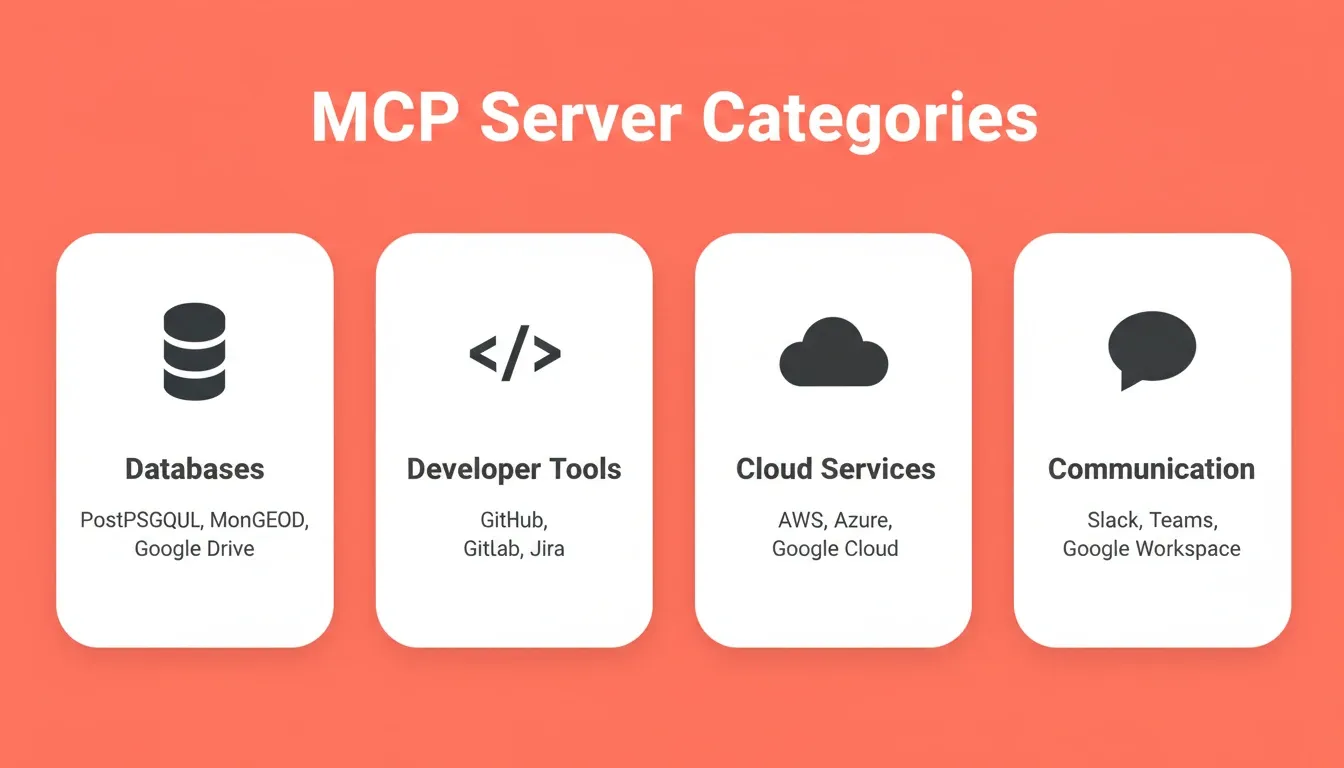
The four major MCP server categories are databases and storage, developer tools, cloud services, and communication platforms.
The Anthropic announcement confirmed over 10,000 active public MCP servers across the ecosystem. Claude now offers 75+ connectors natively powered by Model Context Protocol. Official SDKs in Python and TypeScript account for those 97 million-plus monthly downloads. In December 2025, Anthropic donated MCP to the Linux Foundation's Agentic AI Foundation, co-founded with Block and OpenAI, and supported by Google, Microsoft, AWS, and Cloudflare.
The key advantage of existing MCP servers is reuse. Once a server is built for one AI model, any other model that supports MCP can connect to it without additional development work.
How Are Teams Implementing MCP in Production?
According to Zuplo's State of MCP report surveying 92 technical professionals, the protocol has moved well past experimentation into production environments.
-
Adoption confidence is high: 72% of MCP adopters expect their usage to increase over the next 12 months. Additionally, 54% are confident in MCP's long-term viability as an industry standard.
-
Developer productivity is the top ROI metric: 49% of teams measure MCP value through developer productivity and time savings. Among active users, 30% say the primary benefit is better context for AI responses during tool use.
-
Security remains the biggest blocker: 50% of MCP server builders cite security and access control complexity as their top challenge. Authentication methods split between API keys (40%), OAuth 2.0 flows (32%), and no authentication on local deployments (24%).
-
Gateways lead hosting patterns: 30% of teams use an API or MCP gateway for hosting their MCP servers. They treat these servers like production APIs behind established infrastructure.
For teams building full-stack AI agents in enterprise environments, the 2026 roadmap introduces OAuth 2.1 flows with PKCE, observability layers with audit logging, and gateway patterns. Together, these bring production-grade security to agent workflows that need to scale.
How to Implement MCP in Your Agent Workflow
Getting MCP running in a real agent workflow involves five concrete steps. Whether you use a local stdio server for development or a remote MCP server in production, the pattern stays consistent.
Step 1: Choose your MCP client environment. Most teams start with Claude Desktop, Cursor, or VS Code. These host applications already include built-in MCP client support. For custom applications, the official Python and TypeScript SDKs provide the MCP client libraries you need.
Step 2: Select or build your MCP server. Browse the public MCP server registry for pre-built servers covering your target service. If your tool lacks an existing server, the TypeScript or Python SDK makes it straightforward to build one. You define the tools your server exposes, the parameters each tool accepts, and the logic that runs when the AI model calls them.
Step 3: Configure the transport layer. For local development, configure stdio transport by pointing your MCP client at the server executable. For production deployments with remote MCP servers, configure HTTP with SSE transport and set your server URL in the client configuration.
| Transport | How It Works | Best For |
|---|---|---|
| stdio (Standard I/O) | Client spawns server as a local subprocess; communication via stdin/stdout | Local development, desktop apps, same-machine setups |
| HTTP with SSE | Server runs as a remote HTTP endpoint; client connects via Server-Sent Events | Production deployments, remote MCP servers, cloud-hosted tools |
Step 4: Test capability discovery. Once connected, your MCP client automatically discovers the tools your server exposes through the MCP capability negotiation handshake. Test each tool call manually before wiring it into your agent's agentic workflow to confirm permissions and data formats work as expected.
Step 5: Implement authentication and access controls. Production MCP deployments require explicit authentication. The 2026 MCP roadmap standardizes OAuth 2.1 flows with PKCE for enterprise deployments. For simpler setups, API key authentication covers most development and internal use cases
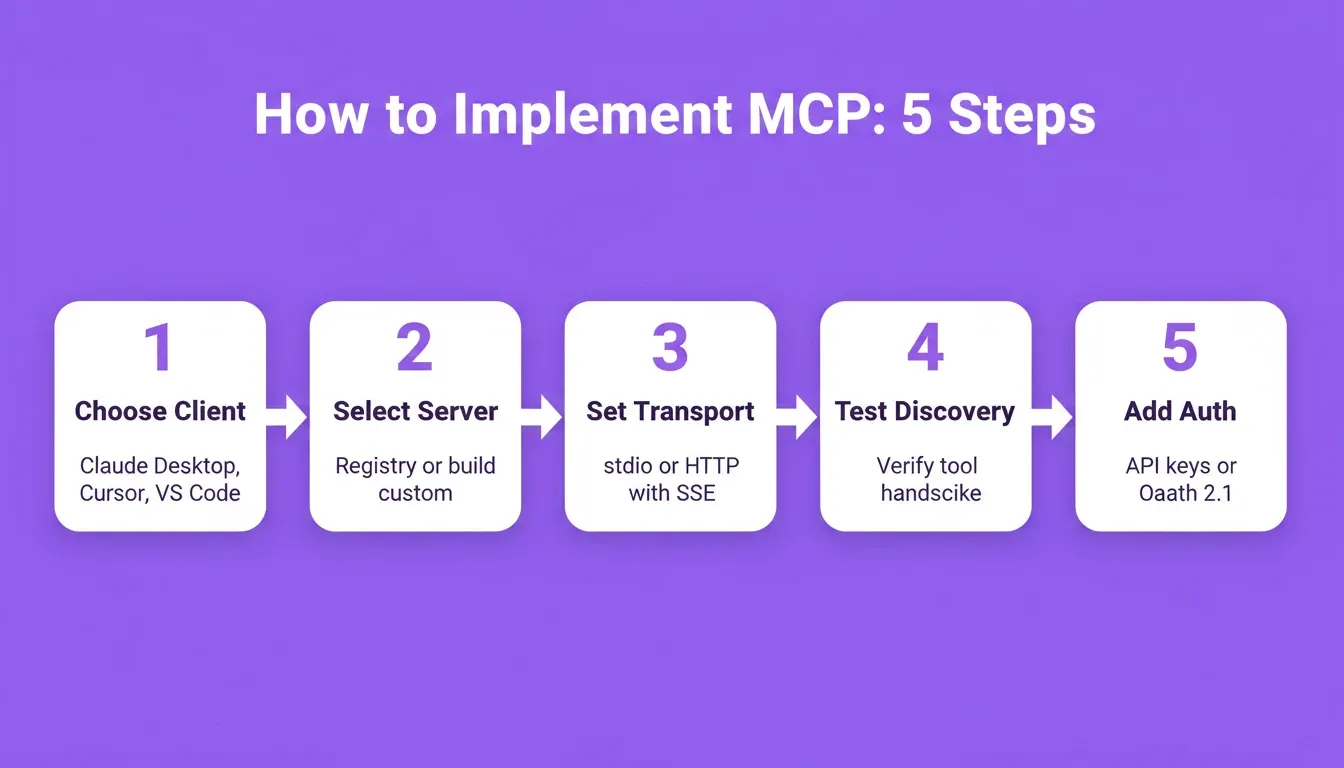
The five-step MCP implementation flow: from choosing your client environment to locking down authentication for production.
What Security Challenges Does MCP Address?
As MCP adoption scales into enterprise environments, the protocol addresses security challenges that traditionally made agent deployments risky. The standardized security model lets teams audit all agent-to-tool communication through a single protocol layer rather than monitoring dozens of separate connections.
-
Strong authentication standards: MCP addresses the authentication gap with its 2026 roadmap. It introduces OAuth 2.1 flows, SSO integration, and fine-grained permission controls. This moves past simple API keys into enterprise-grade identity management for production environments.
-
Controlled access to data systems: Rather than giving agents unrestricted access, MCP defines a controlled way for models to interact with external systems. Each MCP server specifies exactly what operations agents can perform, such as read, write, or execute, preventing unintended actions on sensitive data.
-
Governance for agentic systems: By donating MCP to the Linux Foundation's Agentic AI Foundation, Anthropic eliminated vendor lock-in concerns. The neutral governance model mirrors how Kubernetes and Linux became open standards safe for production deployment worldwide.
-
Legacy systems without added risk: MCP servers can wrap existing APIs and legacy systems without modifying the underlying infrastructure. Early adopters report a reduced security surface compared to building separate custom connectors for each system.
For teams already using Supabase with MCP server patterns, this approach extends naturally to other backend services. Understanding web application security best practices alongside MCP's access controls gives teams a complete picture of how to secure the full agent stack.
Who Benefits Most from MCP for AI Agents?
MCP for AI agents is not a single-audience technology. In fact, different roles unlock different value from the same protocol.
Developers and AI engineers use MCP to eliminate the boilerplate of writing custom connectors. Instead of maintaining separate integration code for each tool an agent touches, they deploy one MCP server per service and connect any model to it. The Python and TypeScript SDKs make server development fast. The standardized function calling interface means any model that supports MCP can use the server immediately.
Product teams and founders use MCP-connected agents to automate workflows that previously required manual tool switching. Pulling data from a CRM, querying a database, posting to a communication platform, and triggering a deployment can all happen from a single agent session. Teams exploring AI workflow builder options will find MCP provides the connectivity layer that makes those workflows composable across any stack.
Enterprise teams use MCP to enforce consistent access control across all agent-to-tool interactions. Rather than managing permissions separately for each custom connector, a single MCP gateway layer handles authentication, audit logging, and rate limiting for every agent in the organization.
Non-technical builders benefit indirectly. Platforms that implement MCP client support internally let non-technical users connect agents to real-world data sources through a prompt rather than a configuration file. No server setup is required.
Why Rocket Simplifies Agent Workflow Development
Building AI agents that connect to multiple MCP servers typically requires setting up authentication, managing client connections, and handling deployment infrastructure. Rocket removes that complexity entirely.
Rocket is a Vibe Solutioning platform. It combines Solve for strategic research and decision intelligence, Build for production-grade app generation in Next.js and Flutter, and Intelligence for continuous competitive monitoring. All three pillars connect through a shared context architecture. 1.5 million people have tried Rocket across 180 countries, from solopreneurs to enterprise teams.
-
From prompt to production-ready app: Describe your agent workflow in natural language. Rocket produces production-ready code that connects to the services you need, without writing custom connector code for each one. Most apps generate in one to three minutes.
-
26+ integrations built in: Stripe, Supabase, OpenAI, Anthropic, Gemini, Perplexity, Google Analytics, Notion, Linear, Airtable, Mailchimp, Mixpanel, and more. Authenticate once and they flow into every build. No separate MCP server configuration is required for supported services.
-
Built-in quality defaults: Every Rocket build ships with SEO-ready structure, WCAG accessibility compliance, GDPR coverage, and performance optimization by default. These are baselines, not optional extras.
-
Shared context across tasks: Rocket's compound context architecture means research from a Solve task, competitive intelligence from an Intelligence task, and product decisions from a previous Build session all carry forward automatically. Nothing is re-explained. Everything compounds.
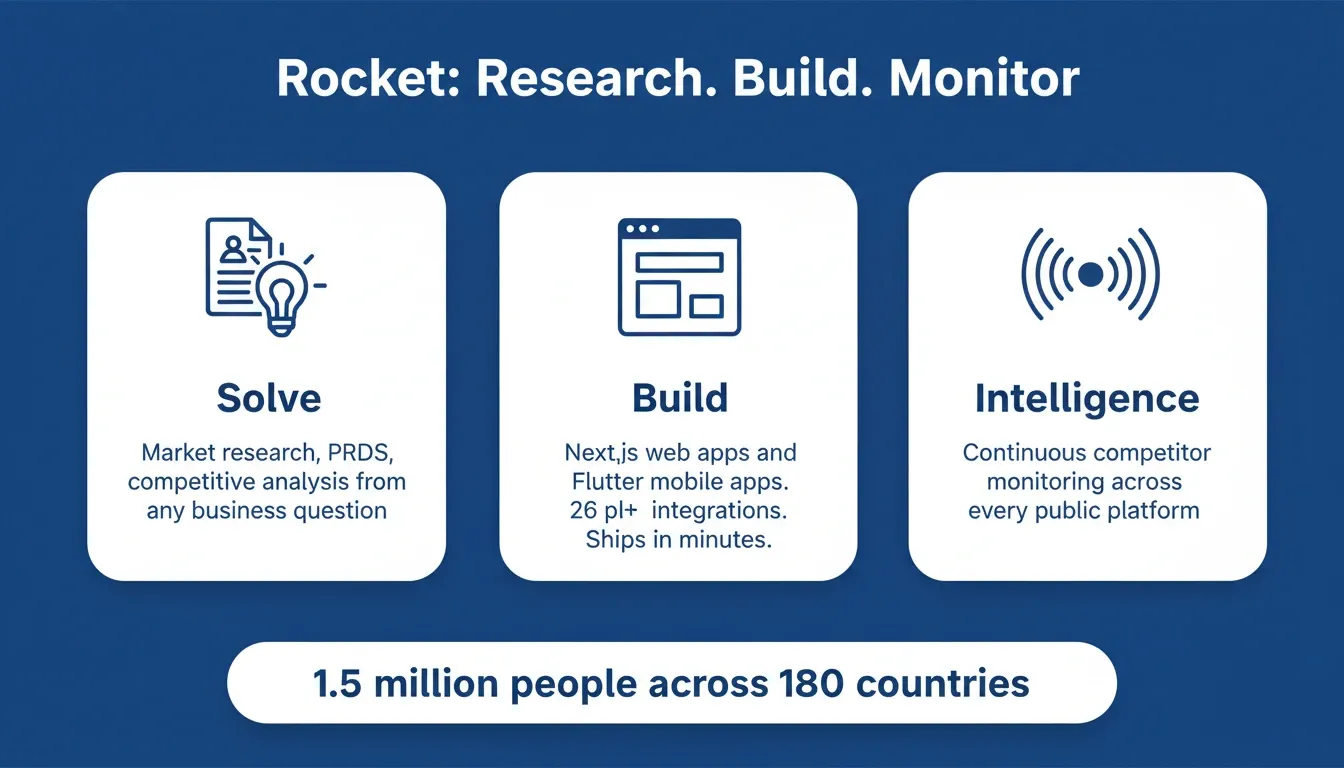
Rocket's three pillars: Solve for research and decisions, Build for production-grade apps, and Intelligence for continuous competitor monitoring.
MCP for AI Agents: The Protocol That Gives Agents Real-World Capability
MCP for AI agents has moved from an Anthropic experiment to the accepted industry standard in under two years. For developers and teams building agents that interact with real-world systems, MCP eliminates the integration tax that made multi-tool agent deployments impractical.
Whether you connect agents to databases, APIs, or entire business tool stacks, the path forward runs through standardized MCP server connections, not custom code written from scratch for each service. As the 2026 roadmap matures with OAuth 2.1, audit logging, and gateway patterns, MCP will only become more viable at enterprise scale.
You have the protocol. You have the ecosystem. Type your workflow into Rocket and ship a production-ready MCP-connected app in minutes. Start building with Rocket now.
Table of contents
- -What s the Model Context Protocol and Why Does It Matter?
- -How Does the MCP Architecture Work?
- -What Can You Build with Existing MCP Servers?
- -How Are Teams Implementing MCP in Production?
- -How to Implement MCP in Your Agent Workflow
- -What Security Challenges Does MCP Address?
- -Who Benefits Most from MCP for AI Agents?
- -Why Rocket Simplifies Agent Workflow Development
- -MCP for AI Agents: The Protocol That Gives Agents Real-World Capability