
20 production-ready AI prompts across five phases to build a complete telemedicine app - from multi-role auth and video consultation to HIPAA-adjacent security patterns, Stripe billing, and reporting dashboards.
Use these AI prompts to build telemedicine app features across five structured phases: multi-role auth, video consultation, patient records, billing, and reporting. This library of 20 production-ready prompts helps healthcare developers and founders ship a complete telehealth platform without writing boilerplate infrastructure code.
How do you build a telemedicine app with AI? Use a phased prompt system: start with authentication and data models, layer in video consultation and clinical notes, add patient records and follow-ups, then handle billing and reporting. Each prompt builds on the previous one so the AI maintains context across the full stack.
Why Structured Prompts Matter for Healthcare App Development
The global telemedicine market is projected to reach $380.33 billion by 2030, growing at a 55% CAGR. U.S. physician adoption surged from 16% to 80.5% between 2019 and 2021, and healthcare providers across 84% of European countries now offer some form of virtual care.
That demand means patients expect digital-first healthcare services today. The question is not whether to build a telemedicine app, but how to build one that ships fast with the right architecture from day one.
Most developers and healthcare professionals who try AI-powered app builders type a single vague prompt and expect production-ready output. That approach fails for telemedicine apps because healthcare delivery systems carry layered complexity, from patient data handling to multi-role access controls.
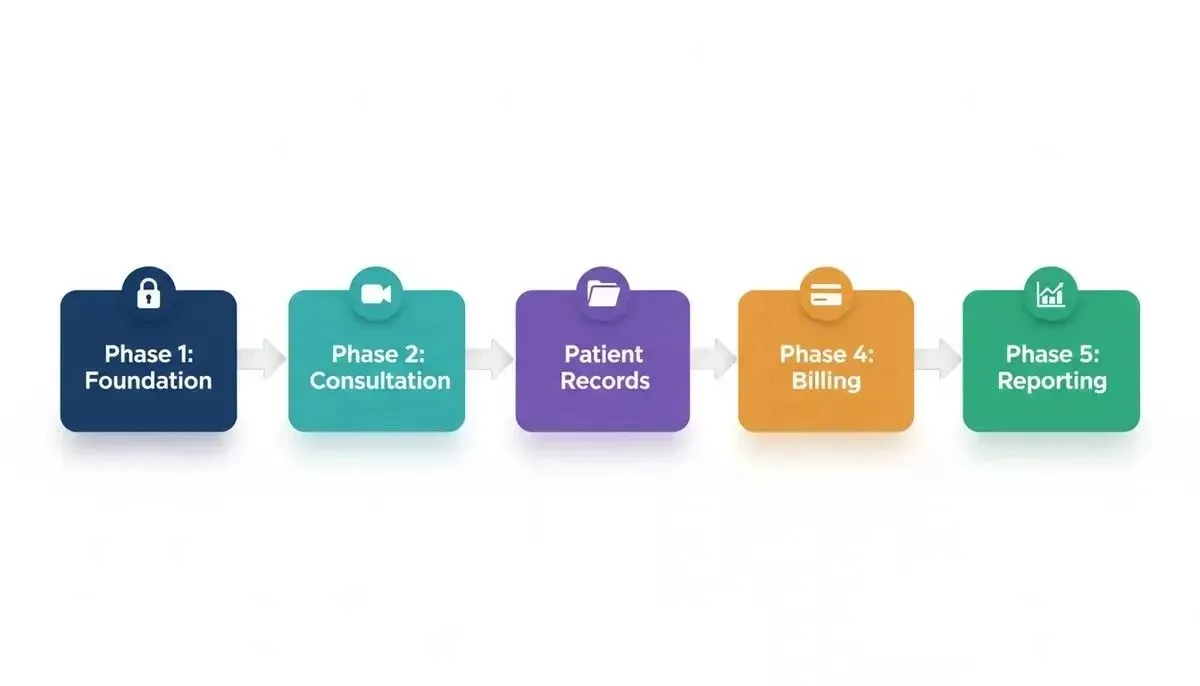
The five-phase prompt pipeline: each phase builds on the data models created in the previous one
Why a Phased Prompt Strategy Works Better
-
Each prompt targets one module rather than asking the AI to scaffold an entire healthcare platform in a single generation pass
-
Build-order sequencing means earlier prompts create the data models that later prompts reference, giving the AI system proper context for conditions like role-based access and patient privacy rules
-
Verification checkpoints between prompts let you catch edge cases in sensitive patient information handling before they compound across the codebase
-
Telemedicine platforms need at least 15 interconnected features, and prompt sequencing prevents the AI from producing disconnected code that requires costly rework
Next, we walk through all five phases with the specific prompts, expected outputs, and refinement strategies that healthcare professionals and developers use in real-world builds on prompt-driven AI platforms.
Phase 1: Foundation Prompts for a Telehealth Platform
Foundation prompts create the data architecture and user access layer that every other module depends on. Get these wrong and patients, doctors, and admin users will face broken workflows throughout the app.
Prompt 1: Multi-Role Authentication System
Prompt: Create a telemedicine app authentication system with three roles: patient, doctor, and admin. Each role should have different dashboard views after login. Include email and password sign-up, role selection during onboarding, and session management with JWT tokens. Add forgot-password flow with email verification.
Expected output: Login and registration screens, role-based routing, protected API routes, token refresh logic.
What to check: Verify that a patient cannot access doctor-only endpoints and that session tokens expire correctly.
Refinement: Add social login with Google OAuth specifically for the patient role. Keep doctor and admin on email-only auth for credential verification purposes.
Rocket generates authentication systems with role-based routing from a single prompt, wiring Supabase auth and JWT handling automatically.
Prompt 2: Doctor Profile with Credentials and Availability
Prompt: Build a doctor profile page displaying name, specialization, medical license number, years of experience, patient reviews, and a weekly availability calendar. Doctors should be able to edit their availability in 30-minute time slots. Include a verification badge system for credentialed healthcare professionals.
Expected output: Doctor profile card component, editable availability grid, credential upload and verification status indicator.
What to check: Confirm that availability slots sync with the appointment booking system and that credential data is stored with proper data encryption.
Refinement: Add a department filter so patients can search doctors by specialty. Include an accepting new patients toggle on each profile.
Prompt 3: Patient Onboarding Flow
Prompt: Create a multi-step patient onboarding flow that collects personal information, emergency contacts, insurance details, preferred pharmacy, and communication preferences. Use form validation on each step. Save progress so patients can resume later without losing data.
Expected output: Stepper component with progress indicator, validated form fields, draft-save functionality with local storage backup.
What to check: Test that partially completed forms persist across browser sessions and that required fields block progression.
Refinement: Add an insurance card photo upload field. Note that automated OCR extraction of policy numbers is a first-pass implementation - verify accuracy manually before relying on it in production.
Prompt 4: Medical History Intake Form
Prompt: Build a comprehensive medical history form for patients. Include sections for current medications, allergies, past surgeries, chronic conditions like diabetes and hypertension, family medical history, and lifestyle factors. Use conditional logic so relevant follow-up questions appear based on patient answers.
Expected output: Dynamic form with conditional branching, medication search with autocomplete, allergy severity selector, and structured patient history data model stored in electronic health records format.
What to check: Verify conditional fields display correctly and that the data model supports downstream features like clinical decision support.
Refinement: Add a Review and Confirm summary screen before submission. Include a PDF export of the completed form for patients to share with external healthcare providers.
Phase 2: Appointment and Consultation Module
This phase covers appointment booking, real-time communication via video calls, clinical documentation, and digital prescriptions. These prompts handle the core telemedicine interaction between patients and doctors.
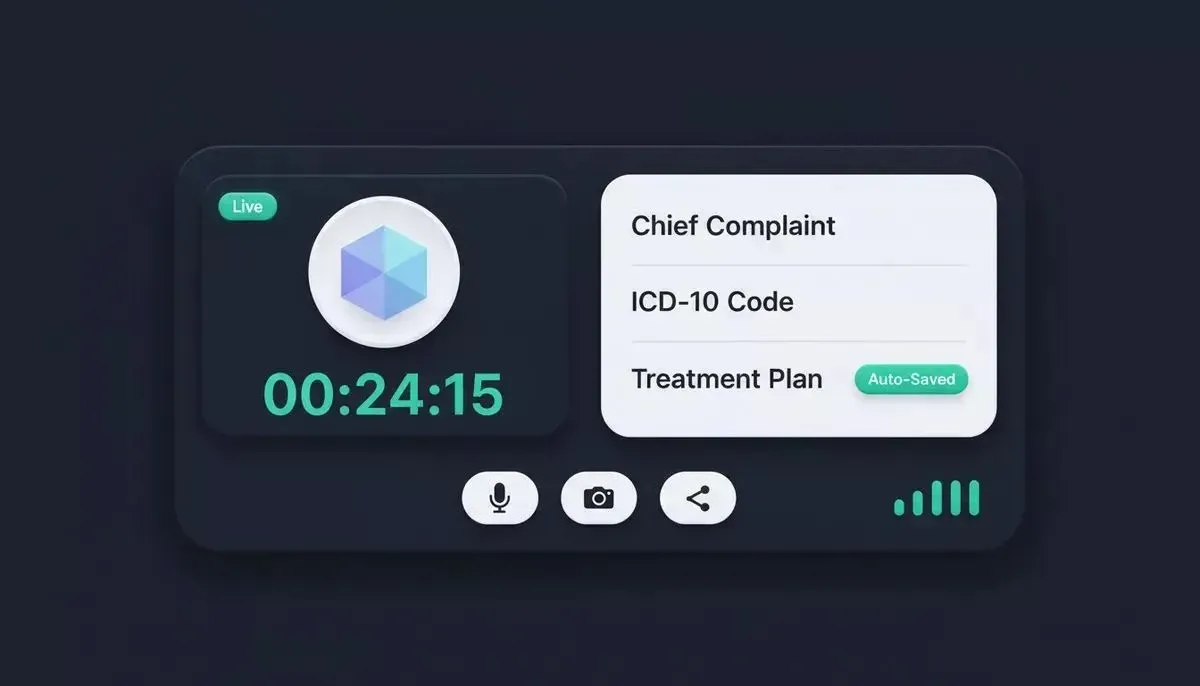
Video consultation room: split-screen interface with media controls, session timer, and clinical notes panel
Prompt 5: Real-Time Slot Booking
Prompt: Build an appointment booking system where patients can view available time slots from their chosen doctor's calendar. Include filters for appointment type (video consultation, phone call, or chat). Show slot availability in the patient's local timezone. Send confirmation via SMS through Twilio and via email through Resend after booking. Add reschedule and cancellation options with a 24-hour policy.
Expected output: Calendar picker with available slots, timezone conversion, booking confirmation SMS via Twilio and email via Resend, cancellation flow with policy enforcement.
What to check: Confirm that double-booking is impossible and that cancelled slots reappear as available for other patients.
Refinement: Add waitlist functionality for fully booked doctors. Notify patients on the waitlist when a slot opens through push notification.
For teams building scheduling-heavy apps, the AI prompts to build appointment scheduling app guide covers the full scheduling architecture in depth.
Prompt 6: WebRTC Video Room
Prompt: Create a WebRTC video consultation room with a waiting area for patients. The doctor should see a queue of patients waiting. Include audio and video mute controls, screen sharing for reviewing lab results, a session timer visible to both parties, and automatic session recording with consent. Add a connection quality indicator.
Expected output: Video room with peer-to-peer connection, waiting room queue, media controls, recording with consent modal, and network quality display.
What to check: Test with multiple concurrent sessions to verify that patient privacy is maintained and connections do not cross.
Refinement: Add an Invite Specialist button that lets the doctor bring a third-party healthcare professional into the active session for second opinions.
Prompt 7: In-Consultation Clinical Notes
Prompt: Build a clinical notes panel that appears alongside the video call interface for doctors. Include structured fields for chief complaint, symptoms, diagnosis codes (ICD-10 search), examination findings, treatment plans, and follow-ups. Auto-save every 30 seconds. Support voice-to-text input for hands-free note-taking during consultations.
Expected output: Split-screen interface with video on one side and notes panel on the other, ICD-10 autocomplete search, auto-save indicator, and speech-to-text toggle.
What to check: Verify auto-save does not disrupt the video connection and that ICD-10 codes map correctly to diagnosis descriptions.
Refinement: Add a Smart Summary button that uses AI to generate a consultation summary from the doctor's raw notes for patient-facing care plans.
Prompt 8: Prescription with Digital Signature
Prompt: Create a prescription module where doctors can prescribe medications with dosage, frequency, duration, and special instructions. Include a drug interaction checker that flags conflicts with the patient's current medication list from their medical history. Add a digital signature pad for the doctor and generate a downloadable PDF prescription.
Expected output: Medication search with dosage suggestions, interaction alert system, e-signature canvas, and PDF generation with clinic letterhead.
What to check: Confirm that drug interactions reference the patient's active medication list and that the PDF contains all legally required prescription elements. Note that electronic pharmacy transmission requires certified third-party integration beyond what a prompt alone can configure.
Refinement: Add a pharmacy search field so patients can select their preferred pharmacy for manual fax or print-and-deliver workflows while you evaluate certified e-prescribing integrations.
| Phase | Prompt | Primary Output | Key Verification Point |
|---|---|---|---|
| Consultation | Slot Booking | Calendar with SMS and email confirmation | No double-booking; timezone accuracy |
| Consultation | Video Room | WebRTC with waiting queue | Session isolation; recording consent |
| Consultation | Clinical Notes | Split-screen with ICD-10 | Auto-save stability; code accuracy |
| Consultation | Prescription | E-sign with PDF generation | Drug interaction flags; legal elements |
Ready to start building?* Rocket generates full-stack Next.js and Flutter code from these prompts - no boilerplate required. *Start building on Rocket.new
Phase 3: Patient Records and Follow-Up Systems
Patient management prompts build the longitudinal health record layer. These handle how patients view their care history, track medications, upload lab results, and receive automated reminders for follow-ups.
Prompt 9: Health Record Dashboard
Prompt: Create a patient health record dashboard showing consultation history, active treatment plans, upcoming appointments, current medications, and recent lab results. Use cards for each category with quick-action buttons. Include a timeline view that shows all care events in chronological order. Support filtering by date range, doctor, or condition.
Expected output: Dashboard with cards, timeline component, filter controls, and links to detailed record views for each entry.
What to check: Verify that records display in correct chronological order and that patients only see their own data, not other patient records. Use Supabase row-level security policies to enforce this at the database level.
Refinement: Add a health score summary card that aggregates key metrics like blood pressure trends, medication adherence percentage, and upcoming preventive care milestones.
Building a healthcare app from scratch? The complete guide to building a healthcare app covers the full architecture from data models to deployment.
Prompt 10: Medication History and Tracking
Prompt: Build a medication management module where patients can view active prescriptions, set daily medication reminders, track adherence with a simple taken or skipped toggle, and view their full prescription history. Include refill request functionality that notifies their prescribing doctor.
Expected output: Medication list with status indicators, reminder scheduling through push notifications, adherence tracking chart, and refill request flow connected to doctor notifications.
What to check: Test that reminders fire at correct times across time zones and that adherence data accurately reflects patient behavior for chronic disease management.
Refinement: Add a weekly adherence report that gets shared automatically with the patient's care team for remote patient monitoring of chronic conditions.
Prompt 11: Lab Result Upload and Display
Prompt: Create a lab result module where patients or clinic staff can upload lab reports as PDFs or images. Display results with normal range indicators (green for normal, yellow for borderline, red for abnormal). Show trend graphs for repeated tests over time.
Expected output: File upload component via Supabase Storage, color-coded result cards, and trend visualization charts.
What to check: Confirm that trend graphs handle missing data points gracefully without breaking the visualization. Note that automated OCR extraction of lab values is a first-pass implementation - verify accuracy against source documents before using results clinically.
Refinement: Add doctor annotation capability so healthcare providers can add context notes directly on uploaded lab results visible to patients.
Prompt 12: Follow-Up Reminder via Twilio
Prompt: Build an automated follow-up reminder system using Twilio SMS. After a consultation ends, schedule SMS reminders based on the doctor's recommendation. Send reminders at 48 hours before and 2 hours before the recommended follow-up date. Include a one-tap booking link in the reminder message. Use Resend for email reminders on the same schedule.
Expected output: Twilio SMS scheduling logic, Resend email scheduling logic, reminder queue with status tracking, deep-link generation for one-tap rebooking.
What to check: Verify that reminders do not fire for cancelled appointments and that the one-tap link pre-fills the correct doctor and appointment type.
Refinement: Add escalation logic: if a patient misses their follow-up window by 3 days, notify the care coordinator for outreach through the patient management system.
Phase 4: Billing and Regulatory Context
Important disclaimer:* The prompts in this phase scaffold technical security patterns commonly associated with healthcare data - encryption, role-based access, audit logging, and consent flows. They do not produce HIPAA compliance. HIPAA compliance requires signed Business Associate Agreements (BAAs) with every subprocessor, a formal risk assessment, breach notification procedures, and ongoing staff training. No AI app builder can generate these through a prompt. Engage a qualified compliance officer before handling real protected health information.*
U.S. digital health funding reached $10.1B in 2024, with AI-enabled startups representing 37% of sector investment as of year-end 2024, much of it flowing toward security-aware healthcare platforms.
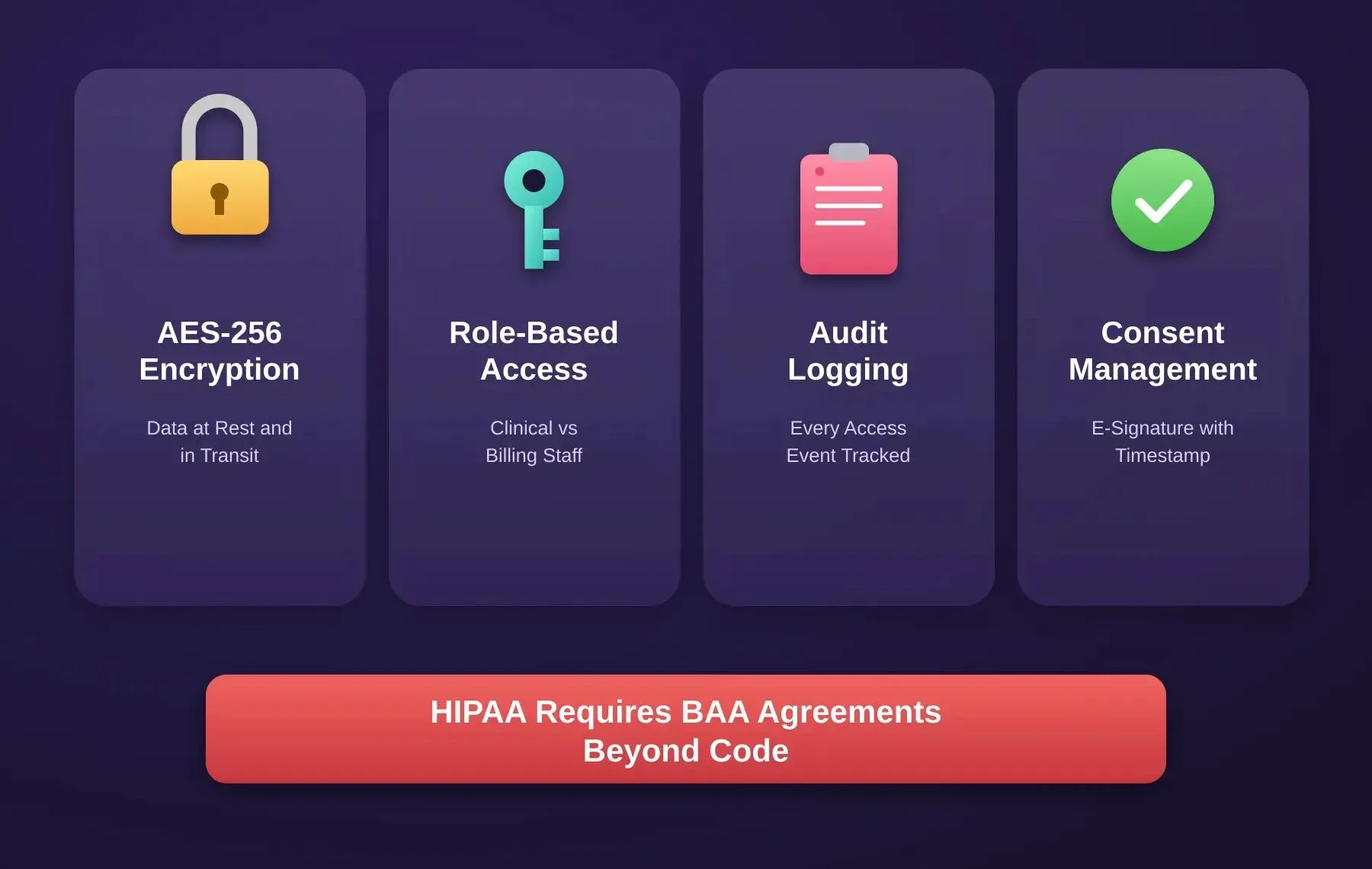
Four technical security pillars scaffolded by these prompts - not a substitute for HIPAA compliance review and BAA agreements
Prompt 13: Insurance Claim Form
Prompt: Create an insurance claim submission module. After a consultation, auto-populate claim fields from session data: patient information, provider details, ICD-10 diagnosis codes, CPT procedure codes, and service date. Support CMS-1500 form format. Allow the billing admin to review, edit, and submit claims electronically. Track claim status with categories: submitted, pending, approved, denied.
Expected output: Auto-populated claim form, CMS-1500 template, admin review interface, and status tracking dashboard with denial reason codes.
What to check: Verify that diagnosis codes from the consultation notes map correctly to the claim and that required fields match payer specifications.
Refinement: Add denial management workflow where rejected claims route back to the billing team with specific error codes and suggested corrections.
Prompt 14: Stripe Out-of-Pocket Payment
Prompt: Build a Stripe payment flow for out-of-pocket consultations. Show patients their consultation fee before booking, process payment after session completion, and generate itemized receipts. Support copay collection where insurance covers partial cost. Include refund logic for cancelled sessions within the policy window.
Expected output: Stripe checkout component, pre-session fee display, post-session charge trigger, receipt generation, and refund processing tied to cancellation policy.
What to check: Test the full payment lifecycle including failed cards, partial refunds, and receipt accuracy against session records.
Refinement: Add subscription billing for patients on monthly care plans with automatic recurring charges and plan management controls.
For a complete walkthrough of wiring Stripe into an AI-built app, see the Stripe payment integration guide.
Prompt 15: Data Security Patterns
Prompt: Configure the telemedicine app with data security patterns appropriate for sensitive health data. Add AES-256 data encryption at rest and TLS 1.3 in transit for all patient data. Use Supabase row-level security policies so clinical staff can access medical records but billing staff only see financial data. Build an audit log that tracks every access event on sensitive patient data with timestamp, user ID, and action type. Add automatic session timeout after 15 minutes of inactivity.
Expected output: Supabase RLS policy definitions, comprehensive audit logging system, session timeout middleware.
What to check: Test the access controls by attempting cross-role data access. Verify audit logs capture all read and write operations on sensitive records. These patterns are a technical foundation - they do not replace a formal HIPAA risk assessment or BAA agreements with subprocessors.
Refinement: Add an admin dashboard showing audit log summaries and access anomalies. Note that Rocket.new's built-in compliance tooling covers GDPR (cookie consent, privacy policies, geo-based consent flows) and CCPA - not HIPAA. Healthcare-specific compliance requires separate legal and operational work.
For teams building secure apps, the web application security checklist covers the full security review process before launch.
Prompt 16: Consent E-Signature
Prompt: Build a consent management system where patients sign terms of service, telehealth consent, data sharing agreements, and treatment consent forms before their first consultation. Use digital e-signature with timestamp and IP address logging. Store signed documents as tamper-proof records. Allow patients to revoke consent with a clear audit trail.
Expected output: Document viewer with e-signature pad, consent version tracking, tamper-proof storage with hash verification, and revocation workflow.
What to check: Verify that unsigned consents block appointment booking and that revoked consents trigger appropriate access restrictions on patient records.
Refinement: Add multi-language support for consent documents. Include a guardian consent flow for minors where a parent or legal representative must co-sign.
Technical data flow: PHI detection triggers AES-256 encryption, then Supabase RLS check, then audit log entry, before billing output. HIPAA compliance requires BAA agreements beyond this technical flow.
Phase 5: Reporting Prompts
Reporting prompts give administrators, doctors, and platform owners the analytics they need to operate and grow their telemedicine services. According to FAIR Health data, telehealth utilization reached 5.04% of medical claims by December 2024, with behavioral health conditions accounting for 66-67% of telehealth claim lines as of the second half of 2024.
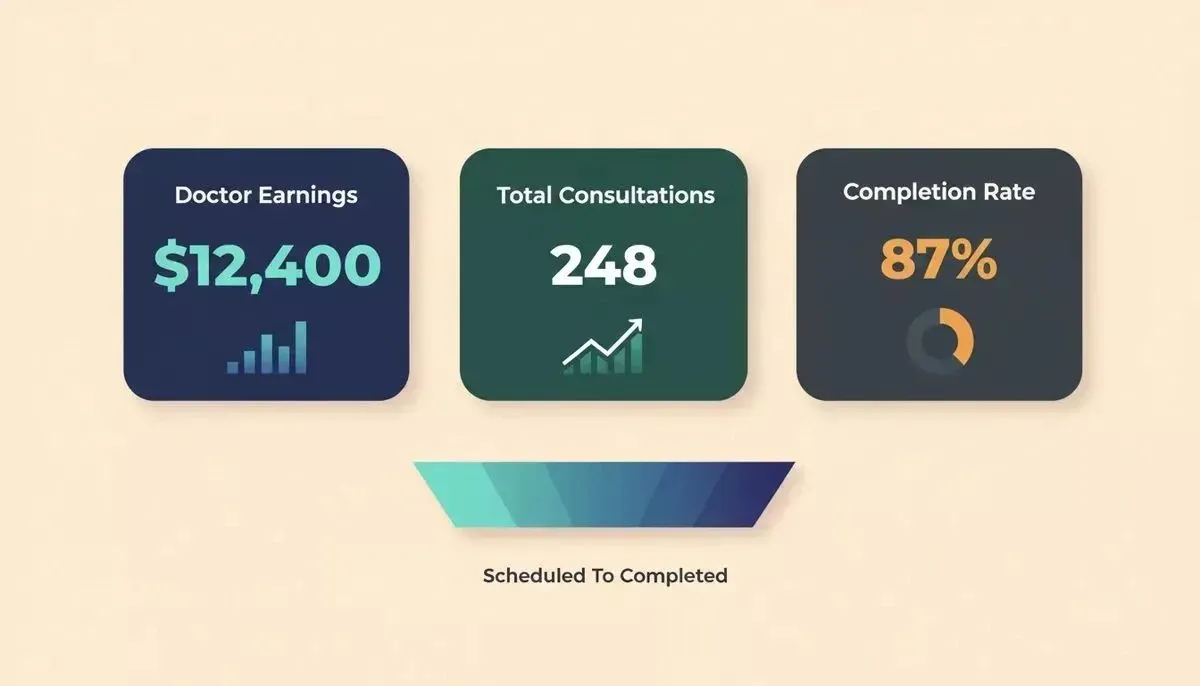
Telemedicine reporting dashboard: earnings, consultation volume, and completion rate cards with trend visualizations
Prompt 17: Doctor Earnings Dashboard
Prompt: Build a doctor earnings dashboard showing total revenue this month, completed consultations count, average rating from patients, pending payouts, and earnings breakdown by consultation type. Include a date range selector and CSV export for tax reporting.
Expected output: Dashboard with revenue cards, consultation counter, rating average, payout schedule, and filterable earnings table with export.
What to check: Verify earnings calculations match actual Stripe payment records and that doctors only see their own financial data.
Refinement: Add comparison metrics showing month-over-month growth and benchmark against platform averages for similar specialties.
For teams building financial reporting dashboards, the dashboard for financial reporting guide covers the full data visualization architecture.
Prompt 18: Platform Utilisation Report
Prompt: Create an admin analytics dashboard showing platform-wide metrics: total active patients, total registered doctors, daily and monthly consultation volume, average wait time, peak usage hours, and geographic distribution of users. Use charts for trend visualization and include real-time counters for active sessions.
Expected output: Admin dashboard with KPI cards, line charts for trends, heatmap for peak hours, geographic map visualization, and live session counter.
What to check: Confirm that metrics update in near real-time and that historical data loads without performance degradation as the platform scales.
Refinement: Add specialty-level breakdown showing which medical departments drive the most virtual visits. Include patient satisfaction scores by department.
Prompt 19: Appointment Completion Rate Tracker
Prompt: Build a report tracking appointment completion rates. Show metrics for: scheduled vs completed vs no-show vs cancelled consultations. Break down by doctor, department, time slot, and patient demographic. Add automated alerts when no-show rates exceed 15% for any doctor.
Expected output: Completion funnel visualization, breakdown tables with filters, automated alert configuration, and weekly summary email to administrators.
What to check: Validate that completion status transitions are captured accurately, especially for sessions that disconnect mid-call due to technical issues versus intentional no-shows.
Refinement: Add predictive scoring using past patient behavior patterns to flag high-risk appointments likely to result in no-shows, so staff can send extra reminders.
Prompt 20: Mobile-Responsive Flutter Audit
Prompt: Run a mobile responsiveness audit on the entire telemedicine app. Check that all screens render correctly on devices from 320px to 1440px width. Verify touch targets meet 44px minimum for accessibility. Test the video consultation room on mobile data connections. Create empty states for all list views when no data exists. Confirm that the Flutter mobile build passes both iOS and Android production quality standards.
Expected output: Responsive breakpoint configurations, accessibility-compliant touch targets, empty state components for all lists, connection-quality adaptive video settings, and platform-specific build validation reports.
What to check: Test on actual devices (not just browser emulators) for the video room especially. Verify that empty states display helpful guidance rather than blank screens.
Refinement: Add offline capability for the patient dashboard so users in underserved areas with intermittent connectivity can still view their health records, medications, and upcoming appointments cached locally.
For teams shipping Flutter apps, the guide to shipping a production Flutter app without a dev team covers the full build-to-deploy workflow.
Why Rocket Generates Production-Ready Telehealth Code Faster
Building a telemedicine platform with these prompts requires an AI builder that understands healthcare context, not just generic code generation. Most AI-powered builders produce surface-level prototypes that fall apart once you need proper data security, role-based routing, or real-time communication channels.
What Rocket Delivers for Healthcare Apps
-
Full-stack output with Flutter and Next.js means you get mobile-native telemedicine apps and a web admin panel from the same prompt session, not separate projects stitched together
-
Native Supabase connector with Postgres database, user authentication, file storage via Storage buckets, edge functions, and row-level security policies pushed via migration scripts - the data layer healthcare apps need, generated from chat
-
Context memory across prompts means your 12th prompt references the data models created in Prompt 1 without you re-explaining the architecture every time
-
Stripe connector handles one-time checkout, recurring subscriptions, and webhook handlers for payment events - wired from a single prompt
-
Twilio connector for SMS appointment reminders and alerts; pair with Resend or SendGrid for email - both available as separate connectors in the same build session
-
SEO and GEO optimization built in - Rocket can add structured data (JSON-LD), AI citation signals, and FAQ schemas so your telehealth platform surfaces in both Google and AI search engines like Perplexity and ChatGPT
The development team at your healthcare startup does not need to choose between speed and quality. Rocket delivers production-grade full-stack code from plain-language prompts, not throwaway mockups.
Community Validation
"Telemedicine is not a threat to the care model; it is a force multiplier. The future belongs to hybrid operators who combine digital convenience with procedural capability." - Alan A. Ayers, MBA, MAcc, President of Urgent Care Consultants
That force multiplier thinking applies directly to how you build. AI tools like Rocket multiply your development capacity so a small team can ship what used to require months of custom engineering.
For a deeper look at how Rocket handles the full-stack output for complex apps, see why Rocket generates Next.js and Flutter.
Platform Capability Overview
| Capability | Rocket | Notes |
|---|---|---|
| Full-stack output (web and mobile) | Next.js and Flutter from one session | Verified: docs.rocket.new/build/overview |
| Native database with RLS | Supabase connector with migration scripts | Verified: docs.rocket.new/build/connectors/supabase |
| SMS notifications | Twilio connector (SMS only) | Verified: docs.rocket.new/build/connectors/twilio |
| Email notifications | Resend, SendGrid, Brevo, Mailchimp connectors | Verified: docs.rocket.new/build/connectors/email-and-messaging |
| Payment processing | Stripe connector with webhook handlers | Verified: docs.rocket.new/build/connectors/stripe |
| Context across prompts | Cross-task @-mentions | Verified: docs.rocket.new/getting-started/task/task-context |
| GEO and AI search optimization | Built-in /Generate GEO And AEO Report command | Verified: docs.rocket.new/build/polish/seo |
| Compliance tooling | GDPR and CCPA only (not HIPAA) | Verified: docs.rocket.new/build/polish/compliance |
Your Prompt Library is the New Development Blueprint
These 20 prompts form a repeatable system, not a one-time experiment. Each phase builds on the previous one, creating a telemedicine platform where patient onboarding flows into clinical workflows, which feed into billing, which generates the reporting data your healthcare organization needs to grow.
The prompts work best when your AI builder maintains context across the full session and outputs production-grade code with proper data models. That is exactly what Rocket was designed to do for healthcare apps and every other vertical.
Ready to build your telemedicine platform? Start with Prompt 1 on Rocket.new and work through all five phases. Your first working prototype can be live in days, not months.
Table of contents
- -Why Structured Prompts Matter for Healthcare App Development
- -Why a Phased Prompt Strategy Works Better
- -Phase 1: Foundation Prompts for a Telehealth Platform
- -Prompt 1: Multi-Role Authentication System
- -Prompt 2: Doctor Profile with Credentials and Availability
- -Prompt 3: Patient Onboarding Flow
- -Prompt 4: Medical History Intake Form
- -Phase 2: Appointment and Consultation Module
- -Prompt 5: Real-Time Slot Booking
- -Prompt 6: WebRTC Video Room
- -Prompt 7: In-Consultation Clinical Notes
- -Prompt 8: Prescription with Digital Signature
- -Phase 3: Patient Records and Follow-Up Systems
- -Prompt 9: Health Record Dashboard
- -Prompt 10: Medication History and Tracking
- -Prompt 11: Lab Result Upload and Display
- -Prompt 12: Follow-Up Reminder via Twilio
- -Phase 4: Billing and Regulatory Context
- -Prompt 13: Insurance Claim Form
- -Prompt 14: Stripe Out-of-Pocket Payment
- -Prompt 15: Data Security Patterns
- -Prompt 16: Consent E-Signature
- -Phase 5: Reporting Prompts
- -Prompt 17: Doctor Earnings Dashboard
- -Prompt 18: Platform Utilisation Report
- -Prompt 19: Appointment Completion Rate Tracker
- -Prompt 20: Mobile-Responsive Flutter Audit
- -Why Rocket Generates Production-Ready Telehealth Code Faster
- -What Rocket Delivers for Healthcare Apps
- -Community Validation
- -Platform Capability Overview
- -Your Prompt Library is the New Development Blueprint