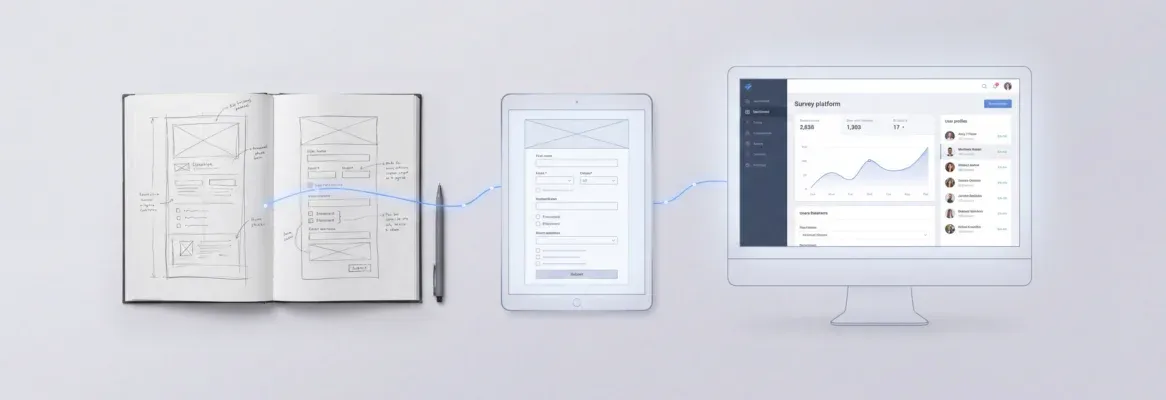
Structured AI prompts for employee portal projects let HR teams build working self-service tools in hours. This blog covers the exact prompts for onboarding, performance, engagement, and talent workflows — no developer required.
Does your HR team answer the same policy questions every week?
According to Forbes Advisor, 64% of businesses now expect AI to increase their overall productivity. That number becomes tangible when you pair generative AI with a smart employee portal.
The gap between "we should automate this" and a working self-service tool used to be months of development time. Now it comes down to writing the right prompt.
This blog gives you the exact AI prompts for employee portal use cases, from onboarding flows to performance reviews to engagement surveys, so your HR team can ship without waiting on a developer.
What Is an Employee Portal?
An employee portal is a secure, centralized web application that gives employees self-service access to HR services, company policies, onboarding materials, benefits information, and communication tools in one place. Modern portals replace scattered email threads, shared drives, and HRIS tickets with a role-based interface that works on any device.
Unlike a full HRIS (Human Resource Information System), an employee portal focuses on the employee-facing experience. It surfaces the information employees need daily without requiring them to contact HR directly. The result is fewer repetitive queries, faster onboarding, and a measurable improvement in employee experience.
To see how HR onboarding software can be built in minutes, start with the right prompt structure. The same approach applies to building a client portal with AI, where structured prompts define every screen and workflow upfront.
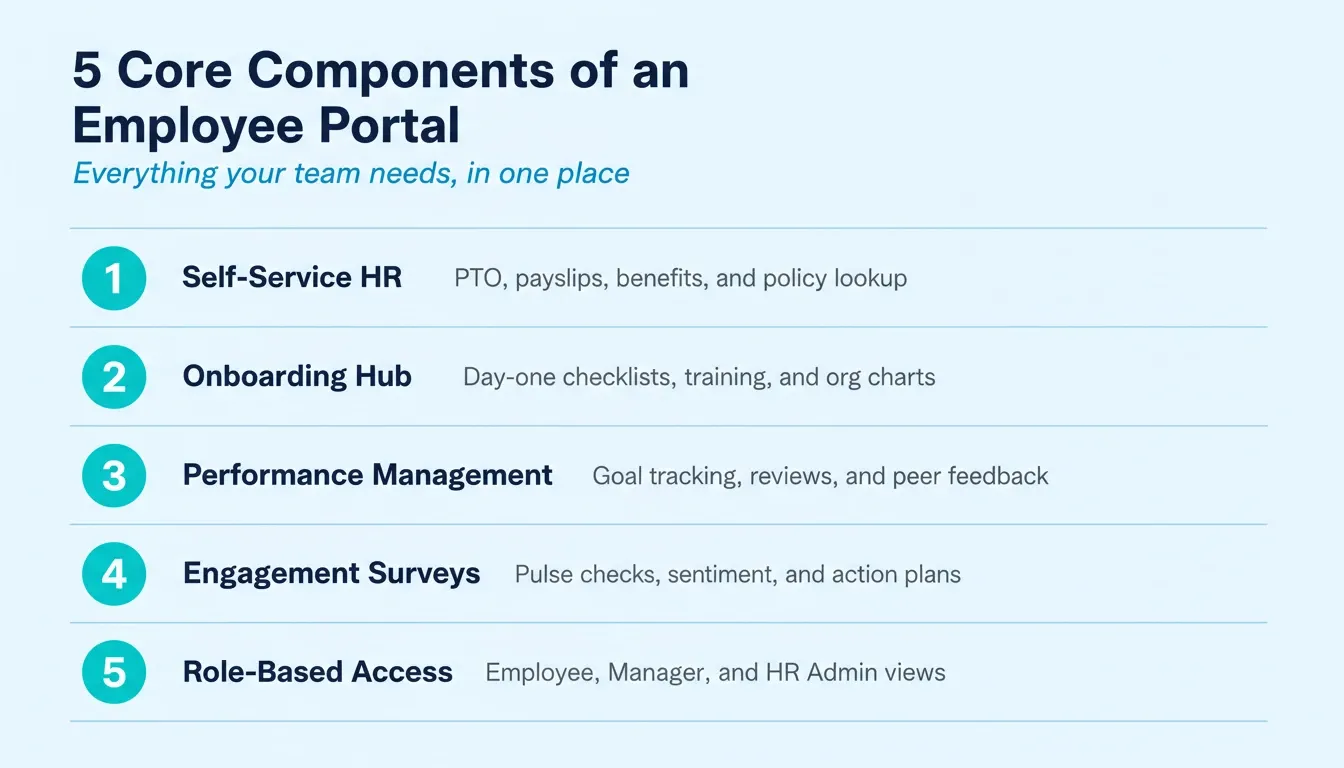
The five core components every effective employee portal covers
Employee Portal vs. HRIS: What Is the Difference?
HR teams often ask whether they need a portal or a full HRIS. The answer depends on what problem they are solving.
| Feature | Employee Portal | HRIS (e.g., Workday, BambooHR) |
|---|---|---|
| Primary focus | Employee self-service experience | HR data management and compliance |
| Build time with AI | Hours to days | Months to years |
| Customization | Fully tailored to your workflows | Limited to vendor templates |
| HR control | HR team manages via chat | Requires vendor support tickets |
| Best for | Teams that need a fast, custom solution | Large enterprises with complex payroll needs |
Many HR teams build a portal first to solve the self-service gap, then connect it to their existing HRIS for payroll and compliance data. The two are not mutually exclusive.
How Do Generative AI Prompts Transform HR Processes?
McKinsey's 2025 State of AI survey found that 88% of organizations regularly use AI in at least one business function. HR and people operations are among the fastest-growing areas. As a result, generative AI prompts are becoming the primary way HR teams create and manage internal tools.
Here is how AI prompts map to specific portal functions:
| HR Function | Prompt Category | Example Output | Time Saved |
|---|---|---|---|
| Onboarding | Welcome sequences, checklist generators | Automated day-one packages | 3 to 5 hrs/hire |
| Policy Access | Document summarizers, FAQ builders | Self-service policy lookup | 2 hrs/week |
| Performance | Review templates, goal frameworks | Manager-ready review drafts | 4 hrs/cycle |
| Engagement | Survey builders, sentiment analyzers | Pulse check dashboards | 6 hrs/quarter |
| Recruitment | Job description writers, interview prep | Candidate-facing portals | 2 hrs/role |
| Reporting | Data aggregators, trend analyzers | Executive HR dashboards | 5 hrs/month |
Generative AI prompts also handle data analysis tasks that used to require dedicated analysts. You can generate summary reports from employee data, flag patterns in survey responses, and create action plans from raw feedback. All of this runs through the same portal interface.
Why HR Teams Need Structured Prompts for Portals
Starting from a blank page is the reason most portal projects stall. HR professionals know what they want the portal to do. However, translating that into something AI can act on requires structure and plain language clarity.
-
Generative AI works best with clear context. A vague prompt like "build me an HR portal" produces vague results. Adding details about your company size, departments, and specific HR processes gives the AI a foundation to build from.
-
Structured prompts save time across the entire HR team. Instead of spending weeks documenting requirements for a developer, a well-crafted prompt gets you a working first draft in minutes.
-
The business world moves faster than traditional software cycles. When a new policy rolls out or a team restructures, your portal needs to adapt immediately. Prompts for HR workflows let you iterate without starting over.
-
Structured prompts remove the time-consuming back-and-forth with developers. Your team describes what they need in plain language, and the AI handles the technical translation.
The right prompt structure turns a blank page into a working portal. The difference between teams that succeed with AI and those that do not usually comes down to how they write their prompts.
The Anatomy of a High-Performing HR Portal Prompt
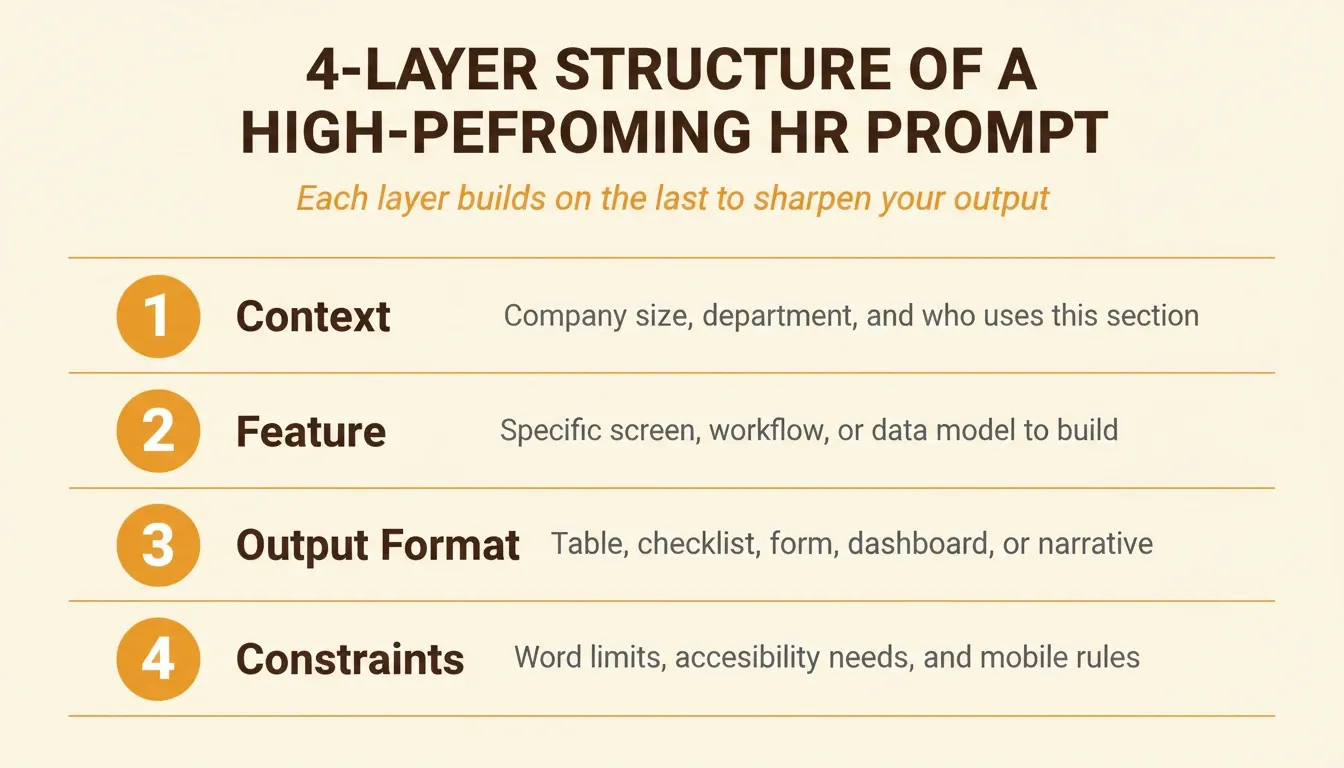
Not all prompts are equal. The best HR portal prompts share a consistent four-layer structure. This structure eliminates ambiguity and produces usable output on the first generation.
Layer 1 — Context: Who uses this section, what company size, and what department? Example: "For a 200-person SaaS company, HR team of three, engineering and sales departments."
Layer 2 — Feature: What specific screen, workflow, or data model does this prompt cover? Example: "Build the new hire onboarding checklist screen."
Layer 3 — Output format: What should the result look like? Example: "Output as an interactive checklist with checkboxes, due dates, and a progress bar."
Layer 4 — Constraints: What limits apply? Example: "Mobile-friendly, accessible to screen readers, no more than 12 items visible at once."
A prompt that includes all four layers generates a first result that needs minimal iteration. A prompt that skips layers two and three generates something generic that requires five rounds of refinement. For a broader look at prompt structure across different app types, best prompts for app building covers the same layered approach applied to web and mobile projects.
How to Build an Employee Portal with AI: Step-by-Step
This workflow takes an HR team from zero to a live, working employee portal without a developer.
The complete workflow from HR prompt to live employee portal
Step 1: Define your portal scope. List the three to five HR functions you want to automate first. Start with onboarding or policy access, ship it, then expand.
Step 2: Write structured prompts. Each prompt should specify who uses this section, what data it shows, what actions users can take, and what the output format should be.
Step 3: Generate your portal. In Rocket, describe your employee portal in plain language. Rocket generates a fully functional Next.js web application with UI, navigation, logic, and production-ready code. Most apps generate in one to three minutes.
Step 4: Connect your integrations. Rocket supports 25+ integrations. For an HR portal, the most useful are Supabase (user authentication and database), Airtable (employee data and workflows), Notion (policy documents), Google Workspace (calendar and directory), and Typeform or Tally (surveys and feedback forms).
Step 5: Set role-based access. Configure three access levels: employees see their own records and general policies; managers see team-level analytics without individual names; HR administrators see full data and reporting. Rocket's built-in three-level access control (Admin, Creator, Viewer) maps directly to this structure.
Step 6: Test with real employees. Share the portal with three to five people before launching. Their reactions will tell you which sections need refinement and which prompts produced the most useful output.
Step 7: Launch and iterate. One-click deployment delivers automatic HTTPS. Every subsequent update happens through chat. Describe the change in plain language and Rocket applies it in context.
Prompts for Onboarding and New Hire Workflows
The onboarding experience sets the tone for every new hire's relationship with your company. These prompts help your HR team build portal sections that welcome new hires without manual effort from the hiring manager.
Prompt 1 — Onboarding schedule: "Create a structured onboarding schedule for a [role] joining the [department] team. Include week-one orientation activities, system access setup, and meetings with their hiring manager and cross-functional partners. Output as an interactive checklist with checkboxes and due dates."
Prompt 2 — Welcome email sequence: "Write a series of three welcome email messages for new hires starting next Monday. The first should be a short introduction to company culture, the second should cover first-day logistics, and the third should include training resources and team contacts. Use a warm, informal tone."
Prompt 3 — Job description to portal profile: "Convert this job description into an employee profile page for our internal portal. Include key responsibilities, reporting structure, and links to relevant training resources. Format for mobile-friendly display."
Prompt 4 — Hiring manager checklist: "Build an interactive checklist for hiring managers to complete before a new hire's first day. Cover equipment requests, system access, buddy assignment, and HR administration tasks. Include a progress tracker showing completion percentage."
Prompt 5 — Day-one resource hub: "Generate a resource page for new hires that includes links to company policies, employee communication channels, team org charts, and their personalized onboarding schedule. Group resources by category with clear section headers."
The best onboarding portals feel personal without requiring manual customization for each person. These prompts give you templates that scale across dozens of new hires simultaneously.
Ready to turn these onboarding prompts into a live portal? Rocket generates a fully functional Next.js web application from plain language in one to three minutes. Start building at Rocket.new
Prompts for Performance Management and Reviews
Writing performance reviews is one of the most time-consuming tasks for line managers. These prompts help build portal tools that make the process faster and more consistent.
Prompt 6 — Performance review draft: "Using the following employee data, draft a performance review that highlights specific metrics and outcomes. Use a constructive tone and include areas for growth with SMART goals attached. Output as a structured form with sections for achievements, development areas, and next-quarter goals."
Prompt 7 — Goal-setting framework: "Generate a goal-setting template based on the SMART goals framework for a [role] in the [department]. Include three professional development objectives and two team-contribution objectives with specific metrics for measuring overall performance. Add a quarterly check-in schedule."
Prompt 8 — Engagement survey builder: "Create a quarterly engagement survey with 12 questions covering job satisfaction, manager support, and career development opportunities. Include a mix of rating scales and open-text response fields. Add a progress bar and estimated completion time."
Prompt 9 — Feedback summary: "Summarize the following peer feedback into three key themes and two actionable recommendations for the employee's next quarter. Focus on reviewing feedback patterns rather than individual comments. Output as a one-page summary suitable for a development conversation."
Prompt 10 — Manager coaching prep: "Based on this employee's last two performance reviews, generate talking points for a development conversation. Include specific metrics, highlight progress on previous goals, and suggest two areas for the next review cycle. Format as a structured agenda with time allocations."
These prompts transform performance management from a dreaded annual event into an ongoing, data-backed conversation. For a broader view of how AI prompts for HR management systems work across the full people ops stack, the same prompt principles apply.
Want to ship your performance management portal today? Rocket builds production-ready apps with role-based access, Supabase authentication, and 25+ integrations. Start building at Rocket.new
What Makes a Strong Prompt for Employee Communication?
Most employee portals fail at one thing: communication that actually gets read. Internal communications through a portal need to feel relevant, not like corporate noise. The difference comes down to how you prompt the AI to write.
-
Specify the audience segment. A prompt that says "write a policy update" produces generic output. A prompt that says "write a policy update for remote employees in the engineering department, using an informal tone and bullet points" produces something people actually read.
-
Include context about existing employee engagement levels. If your team recently ran an engagement survey and learned that employees feel disconnected from company values, your communication prompts should address that gap directly.
-
Reference specific policy documents. When building a portal section for company policies, feed the AI your actual policy documents. Ask it to "summarize this 40-page benefits guide into a searchable FAQ with plain language answers for frontline employees."
-
Set the tone and length explicitly. Employee communication works best when it matches how people actually talk. Specify whether you want formal announcements or casual updates.
The strongest portal communications mirror how employees actually talk to each other. That authenticity is what separates portals people use daily from ones they ignore.
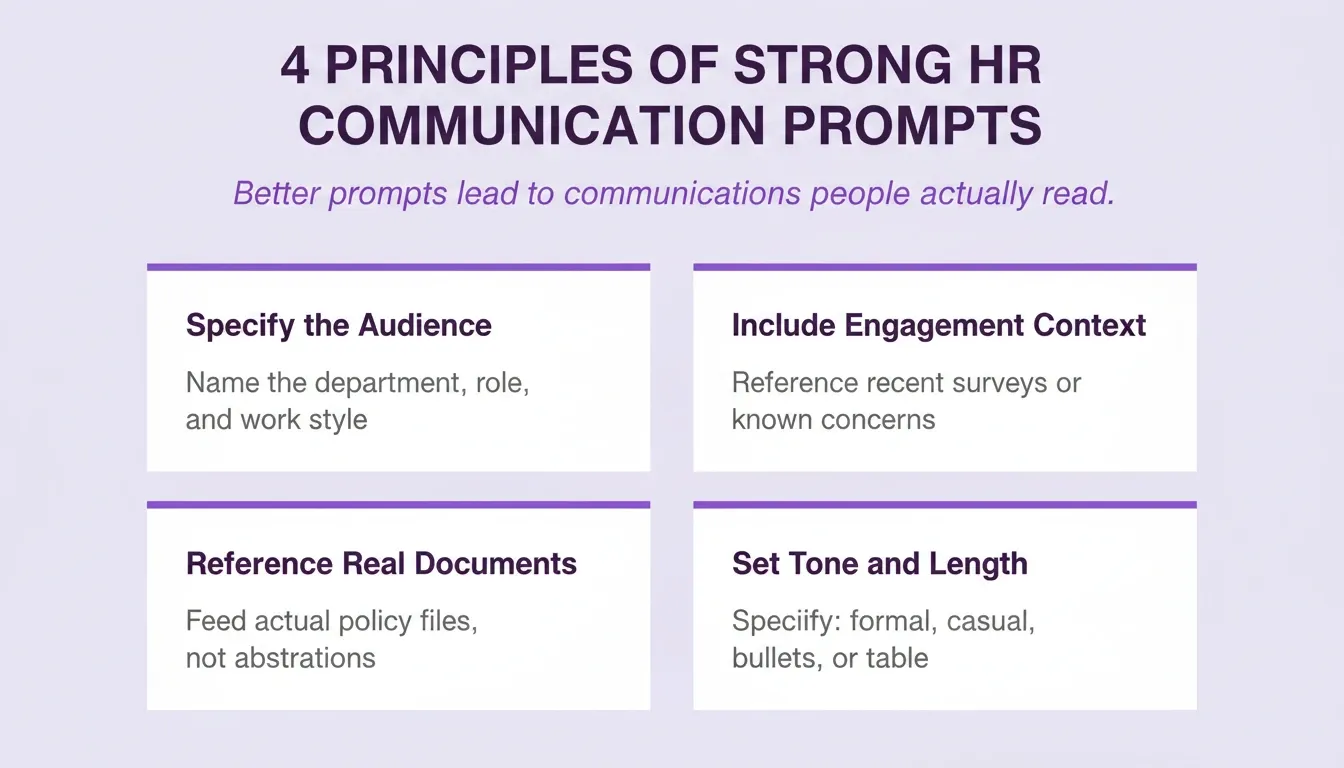
Four principles that make HR portal communication prompts consistently produce better output
Engagement Surveys and Employee Sentiment Analysis
Understanding employee sentiment at scale requires more than annual surveys. Modern portals use AI to continuously analyze open-text feedback and surface patterns your HR team might miss.
Prompt 11 — Sentiment analysis: "Analyze the following batch of employee comments from our quarterly engagement survey. Group responses by key themes, identify the top three positive trends and top three concerns, and flag any mentions of people data that suggest turnover risk. Output as an executive summary with a visual breakdown by department."
Prompt 12 — Follow-up questions generator: "Based on the results of our last engagement survey showing low scores in career development, generate five follow-up questions for a pulse check that will help us understand the root causes. Keep questions under 15 words each."
Prompt 13 — Action planning: "Using the attached engagement survey results, create an action plan with specific initiatives addressing the bottom three scoring areas. Include timeline, responsible team, and how results will be communicated back to employees. Format as a 90-day roadmap."
Prompt 14 — Trend comparison: "Compare employee engagement scores from Q1 and Q2. Highlight which departments improved, which declined, and suggest what the next survey should focus on based on open text feedback themes. Include a simple chart description for the dashboard."
Prompt 15 — Pulse check builder: "Create a five-question pulse check survey for employees in the [department] team. Focus on workload, team collaboration, and manager support. Use a five-point rating scale and include one open-text question. Keep the total completion time under three minutes."
When your portal handles sentiment analysis through prompts, people data becomes actionable insights rather than a static report sitting in someone's inbox.
Turn your engagement data into a live dashboard. Rocket connects to Typeform, Tally, and Airtable out of the box, so your survey results flow directly into your portal. Start building at Rocket.new
Prompts for Talent Acquisition and the Recruitment Process
Building a portal that supports talent acquisition means creating candidate-facing pages and internal hiring tools in the same system. Mercer's Global Talent Trends 2026 report, surveying nearly 12,000 executives, HR leaders, employees, and investors, confirms that organizations redesigning work to blend human capability with automation see the strongest workforce outcomes.
Prompt 16 — Interview questions bank: "Generate a bank of 20 behavioral interview questions for a [role] position. Organize them by competency: problem solving, collaboration, leadership potential, and technical aptitude. Include follow-up probes for each question. Format as a printable interview guide."
Prompt 17 — Job description optimizer: "Rewrite this job description to attract more diverse candidates. Remove gendered language, replace jargon with plain language, highlight growth opportunities and talent development paths, and keep it under 600 words. Add a section on team culture and working style."
Prompt 18 — Candidate portal page: "Build a candidate portal page that shows application status, upcoming interview topics, team info, and company culture highlights. Make it mobile-friendly. Include a timeline showing where the candidate is in the process."
Prompt 19 — Hiring pipeline tracker: "Create a dashboard for tracking candidates through our recruitment process stages: applied, phone screen, technical interview, final round, offer. Include employee retention metrics for each source channel. Add filters by department and role level."
Prompt 20 — Talent development plan: "Based on this employee's skills assessment and career goals, generate a 90-day talent development plan with specific courses, stretch assignments, and mentorship connections. Help HR leaders match internal opportunities to employee turnover risk signals. Include a monthly check-in schedule."
These prompts handle both sides of the hiring equation. They help attract great candidates while giving your internal HR team the tools to manage pipeline data without spreadsheets. Scheduling interviews and follow-ups is another area where AI prompts add speed. The same principles apply to building an appointment scheduling app that integrates directly with your portal.
Ready to build your recruitment portal? Rocket generates candidate-facing pages and internal hiring dashboards from a single prompt. Start building at Rocket.new
How Can Prompts Handle Sensitive Employee Data Safely?
When your portal touches employee data, the prompts you write need built-in guardrails. Sensitive employee data such as salary information, health records, and disciplinary notes requires careful handling that goes beyond a simple privacy disclaimer.
Prompt 21 — Data boundary: "Build an FAQ section that answers HR-related questions about benefits and PTO policies using only publicly available company handbook information. Do not reference any individual employee data, historical data about specific people, or confidential records."
Prompt 22 — Role-based access: "Create separate portal views for employees, managers, and HR administrators. Employees see their own records and general policies. Managers see team-level analytics without individual names. HR administrators see the full executive summary with actionable recommendations and export options."
Prompt 23 — Audit trail: "Add logging to all portal interactions where employees access or modify sensitive employee data. The log should capture timestamp, user role, data category accessed, and action taken. Display the audit log to HR administrators only."
Prompt 24 — GDPR compliance: "Add a data consent banner to the portal that explains what employee data is collected, how it is used, and how employees can request deletion. Include a downloadable data export option for GDPR compliance. Link to the company privacy policy."
Prompt 25 — Sensitive matter routing: "Build a routing logic that detects when an employee submits a query about a sensitive HR matter such as a complaint, medical leave, or disciplinary issue. Route these queries directly to an HR administrator rather than displaying an automated response."
AI generates drafts and recommendations. Final decisions on employment, compensation, or status always stay with trained HR professionals. That boundary is not a limitation; it is the design.
For teams building portals that also handle external-facing requests, the same data-handling principles apply to a customer support portal built with AI prompts.
Need a portal that handles sensitive data safely? Rocket ships with GDPR support, WCAG accessibility baseline, and three-level role-based access control built in. Start building at Rocket.new
How a well-prompted employee portal routes queries: self-service for routine requests, human review for sensitive HR matters
Employee Portal Options Compared: AI Builder vs. Traditional Approaches
Before committing to a build approach, HR teams typically evaluate three paths. Here is how they compare on the dimensions that matter most.
| Approach | Build Time | Customization | Maintenance | HR Control |
|---|---|---|---|---|
| Custom development | 3 to 6 months | Full | Requires dev team | Low |
| HRIS add-on | 2 to 4 weeks | Limited | Vendor-managed | Low |
| Low-code tools | 2 to 6 weeks | Moderate | IT-dependent | Moderate |
| AI builder | Hours to days | Full | HR-managed via chat | High |
The AI builder path is not just faster. It fundamentally changes who controls the portal. When an HR leader can describe a change in plain language and see it live within minutes, the portal becomes a living tool rather than a frozen artifact waiting for the next development sprint.
How to Measure Employee Portal Success
Building the portal is step one. Knowing whether it is working is step two. These are the metrics that matter most for HR portal performance.
Adoption rate: What percentage of employees log in at least once per week? A healthy portal sees 60 to 80% weekly active usage within the first quarter of launch. Low adoption usually signals a navigation or awareness problem, not a content problem.
HR query deflection rate: How many HR questions does the portal answer without an employee contacting HR directly? Track this by comparing HR ticket volume before and after launch. A well-built portal typically deflects 30 to 50% of routine queries within 60 days.
Onboarding completion rate: What percentage of new hires complete their onboarding checklist within the first two weeks? This is the clearest signal of whether your onboarding prompts produced a portal section that actually works.
Engagement survey response rate: Portals that surface surveys in context typically see 20 to 40% higher response rates than separate email surveys. Track this per survey cycle.
Time to first HR self-service action: How long does it take a new employee to complete their first self-service task? This measures how intuitive your portal navigation is.
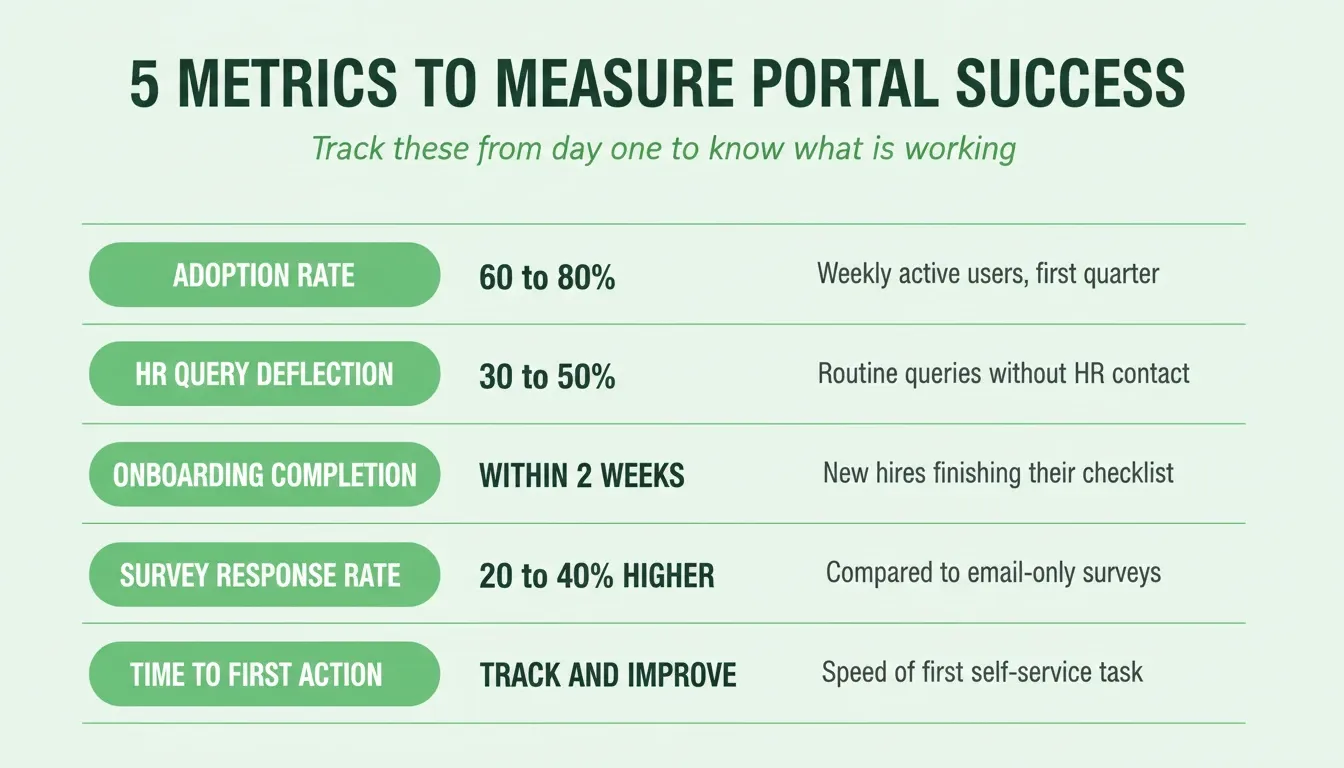
Five metrics that tell you whether your employee portal is actually working
Use these metrics to decide which portal sections to refine next and which prompts to update in your quarterly review.
Common Mistakes When Writing HR Portal Prompts
Even experienced HR teams make these errors when starting with AI-powered portal building. Knowing them in advance saves significant iteration time.
Mistake 1: Starting with the technology, not the problem. The best portal prompts start with the employee experience, not the feature list. "Help new hires feel confident and connected on day one" produces better output than "build an onboarding checklist app."
Mistake 2: Omitting the audience. Every prompt should specify who uses this section. "Write a policy summary for frontline retail employees who work split shifts" produces far more relevant output than "write a policy summary."
Mistake 3: Front-loading every feature. The Rocket Build documentation recommends the 3 to 5 feature rule. List the most important features upfront and add more through chat after the first generation. Trying to build everything at once produces cluttered, inconsistent results.
Mistake 4: Skipping the output format. Specify whether you need a table, bullet list, form, dashboard, or narrative. Unspecified format means the AI chooses, and it may not match how your employees actually consume information.
Mistake 5: Not testing with real employees. Portal sections that look good to HR often confuse employees. Share every major section with three to five real users before launch. Their reactions reveal which prompts need refinement.
Mistake 6: Treating the first generation as final. The first generation is a starting point, not a finished product. Iterate in layers: structure first, then tone, then data connections. For a deeper look at how to refine AI-built tools, internal tool prompt patterns follow the same layered approach.
Build Your Employee Portal Faster with Rocket
You have the prompts. The bottleneck is turning them into an actual working portal that employees can log into, search, and interact with. That is where Rocket changes the equation.
Rocket is the world's first vibe solutioning platform. It combines strategic research (Solve), AI app building (Build), and competitive intelligence (Intelligence) in a single product. According to the official Rocket.new documentation, Build generates production-ready Next.js web apps and Flutter mobile apps from natural language. 1.5 million people across 180 countries have tried Rocket, from solo founders to enterprise teams. The platform is backed by Salesforce Ventures and Accel.
For HR teams building employee portals, the Build pillar does the heavy lifting. Before you write a single prompt, you can also use Solve to validate which HR workflows create the most friction, size the time savings, and scope the portal correctly. That research carries forward into every Build task automatically.
What Rocket generates for your employee portal:
-
A fully functional Next.js web application with UI, navigation, and production-ready code, generated in one to three minutes
-
Supabase integration for user authentication, employee database, and file storage, connected in one step
-
Three-level role-based access control (Admin, Creator, Viewer) that maps directly to HR, manager, and employee views
-
SEO-ready structure, WCAG accessibility baseline, and GDPR support as part of every build
-
25+ integrations including Airtable, Notion, Google Workspace, Typeform, Tally, Mailchimp, Resend, Brevo, Calendly, and HubSpot
-
Full version history with one-click rollback, so every change is reversible
-
Staging and production environments so you can test before employees see it
-
Built-in analytics tracking visitors, conversions, accessibility, and Core Web Vitals after launch
How the build process works:
-
Describe your employee portal in plain language at rocket.new
-
Rocket surfaces clarifying questions about target users, key screens, and data model
-
Generation completes in one to three minutes with a live preview
-
Iterate through Chat (natural language), Visual Edit (click any element), or Code (full source access)
-
Connect integrations from the Connectors panel with a single API key or OAuth
-
Click Launch for one-click deployment with automatic HTTPS and a shareable URL
-
Add a custom domain directly from the Launch panel
Rocket Pricing
| Plan | Price | Credits/Month | What's Included |
|---|---|---|---|
| Free | $0 | 20 (one-time) | Build production-ready apps + Light Solve |
| Pro | $25/mo | 100 | Build + Light Solve research |
| Rocket | $50/mo | 250 | Build + Full Solve (auto-routed) + Intelligence |
| Booster | $250/mo | 1,500 | Build + Full Solve + Intelligence + premium support |
All paid plans include unlimited team members. Credits power all three pillars: Solve research, Build generation, and Intelligence monitoring. Credits can be added on top of any subscription as needed.
Additional Tips for Writing Better Portal Prompts
A few patterns make your AI prompts consistently produce better results across any portal project.
-
Add constraints that matter. Word limits, reading level targets, and accessibility requirements all improve output quality. Generative AI prompts with constraints produce more focused, usable content than open-ended requests.
-
Reference real examples. Paste in a sample of an existing portal page you like and ask the AI to follow that structure. This solves the challenge of describing abstract requirements.
-
Iterate in layers. Start broad, then refine. Your first prompt builds the structure. Your second prompt fixes tone. Your third prompt adds specific HR tools data and links.
-
Use @-mentions for context. In Rocket, use @-mentions to reference previous tasks, uploaded files, or research from Solve. This carries context forward without re-explaining what already exists.
-
Name your screens explicitly. Prompts that name screens such as "the Employee Dashboard screen" or "the Manager Analytics screen" produce cleaner navigation and more consistent UI than prompts that describe features abstractly.
-
Upload your existing HR documents. Rocket can read PDFs, spreadsheets, and Markdown files. Uploading your current employee handbook, org chart, or benefits guide gives the AI real context to build from rather than generic placeholders.
Ship Your Portal Before the Week Is Out
AI prompts for employee portal projects are only getting sharper. As generative AI models improve and HR teams develop stronger prompt libraries, the gap between "idea" and "live portal" will keep shrinking. The teams that build this skill now will iterate faster, adapt to policy changes instantly, and deliver better employee experiences than those still waiting on development queues.
You already know what your employees need. Describe it in plain language and ship a production-ready portal before end of week. Start at Rocket.new.
Table of contents
- -What Is an Employee Portal?
- -Employee Portal vs. HRIS: What Is the Difference?
- -How Do Generative AI Prompts Transform HR Processes?
- -Why HR Teams Need Structured Prompts for Portals
- -The Anatomy of a High-Performing HR Portal Prompt
- -How to Build an Employee Portal with AI: Step-by-Step
- -Prompts for Onboarding and New Hire Workflows
- -Prompts for Performance Management and Reviews
- -What Makes a Strong Prompt for Employee Communication?
- -Engagement Surveys and Employee Sentiment Analysis
- -Prompts for Talent Acquisition and the Recruitment Process
- -How Can Prompts Handle Sensitive Employee Data Safely?
- -Employee Portal Options Compared: AI Builder vs. Traditional Approaches
- -How to Measure Employee Portal Success
- -Common Mistakes When Writing HR Portal Prompts
- -Build Your Employee Portal Faster with Rocket
- -Rocket Pricing
- -Additional Tips for Writing Better Portal Prompts
- -Ship Your Portal Before the Week Is Out